This documentation is for an unreleased version of Apache Flink. We recommend you use the latest stable version.
Balanced Tasks Scheduling
Balanced Tasks Scheduling #
This page describes the background and principle of balanced tasks scheduling, how to use it when running streaming jobs.
Background #
When the parallelism of all vertices within a Flink streaming job is inconsistent,
the default strategy
of Flink to deploy tasks sometimes leads some TaskManagers have more tasks while others have fewer tasks,
resulting in excessive resource utilization at some TaskManagers
that contain more tasks and becoming a bottleneck for the entire job processing.
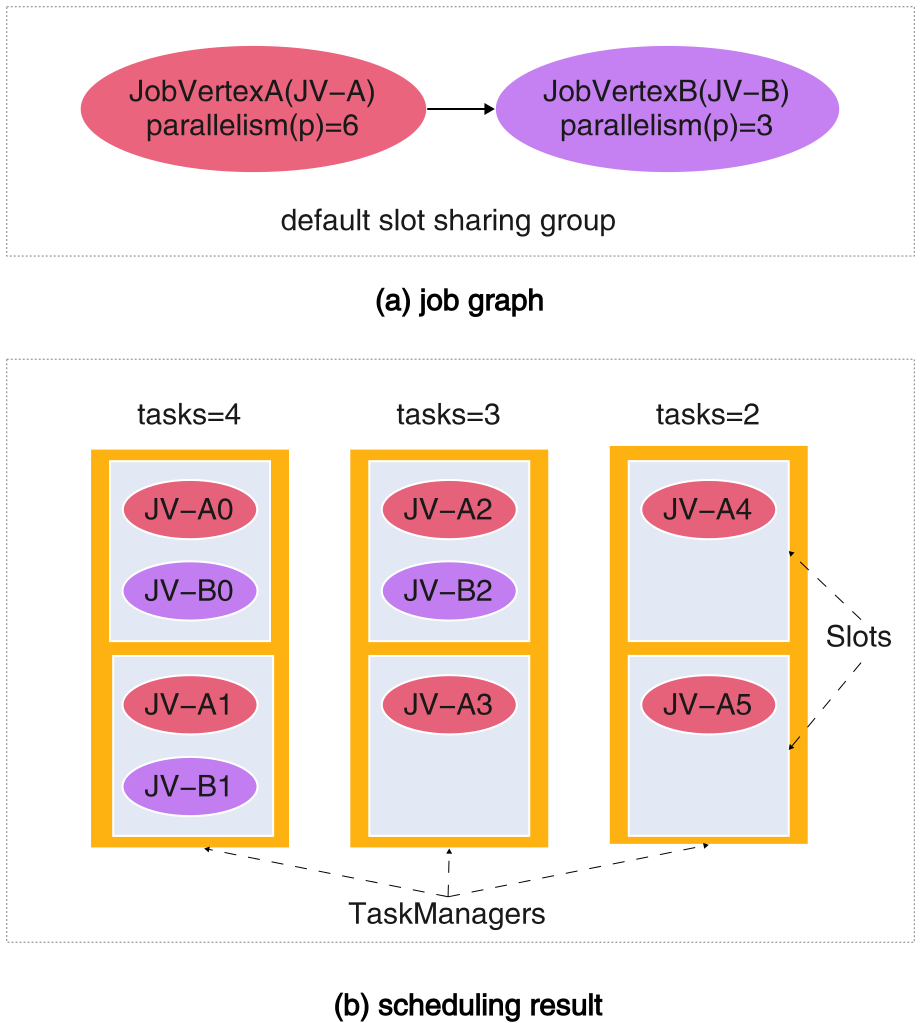
As shown in figure (a), given a Flink job comprising two vertices, JobVertex-A (JV-A) and JobVertex-B (JV-B),
with parallelism degrees of 6 and 3 respectively,
and both vertices sharing the same slot sharing group.
Under the default tasks scheduling strategy, as illustrated in figure (b),
the distribution of tasks across TaskManagers may result in significant disparities in task load.
Specifically, the TaskManagers with the highest number of tasks may host 4 tasks,
while the one with the lowest load may have only 2 tasks.
Consequently, the TaskManagers bearing 4 tasks is prone to become a performance bottleneck for the entire job.
Therefore, Flink provides the task-quantity-based balanced tasks scheduling capability.
Within the job’s resource view, it aims to ensure that the number of tasks
scheduled to each TaskManager as close as possible to,
thereby improving the resource usage skew among TaskManagers.
Note The presence of inconsistent parallelism does not imply that this strategy must be used, as this is not always the case in practice.
Principle #
The task-quantity-based load balancing tasks scheduling strategy completes the assignment of tasks to TaskManagers in two phases:
- The tasks-to-slots assignment phase
- The slots-to-TaskManagers assignment phase
This section will use two examples to illustrate the simplified process and principle of how the task-quantity-based tasks scheduling strategy handles the assignments in these two phases.
The tasks-to-slots assignment phase #
Taking the job shown in figure (c) as an example, it contains five job vertices with parallelism degrees of 1, 4, 4, 2, and 3, respectively.
All five job vertices belong to the default slot sharing group.
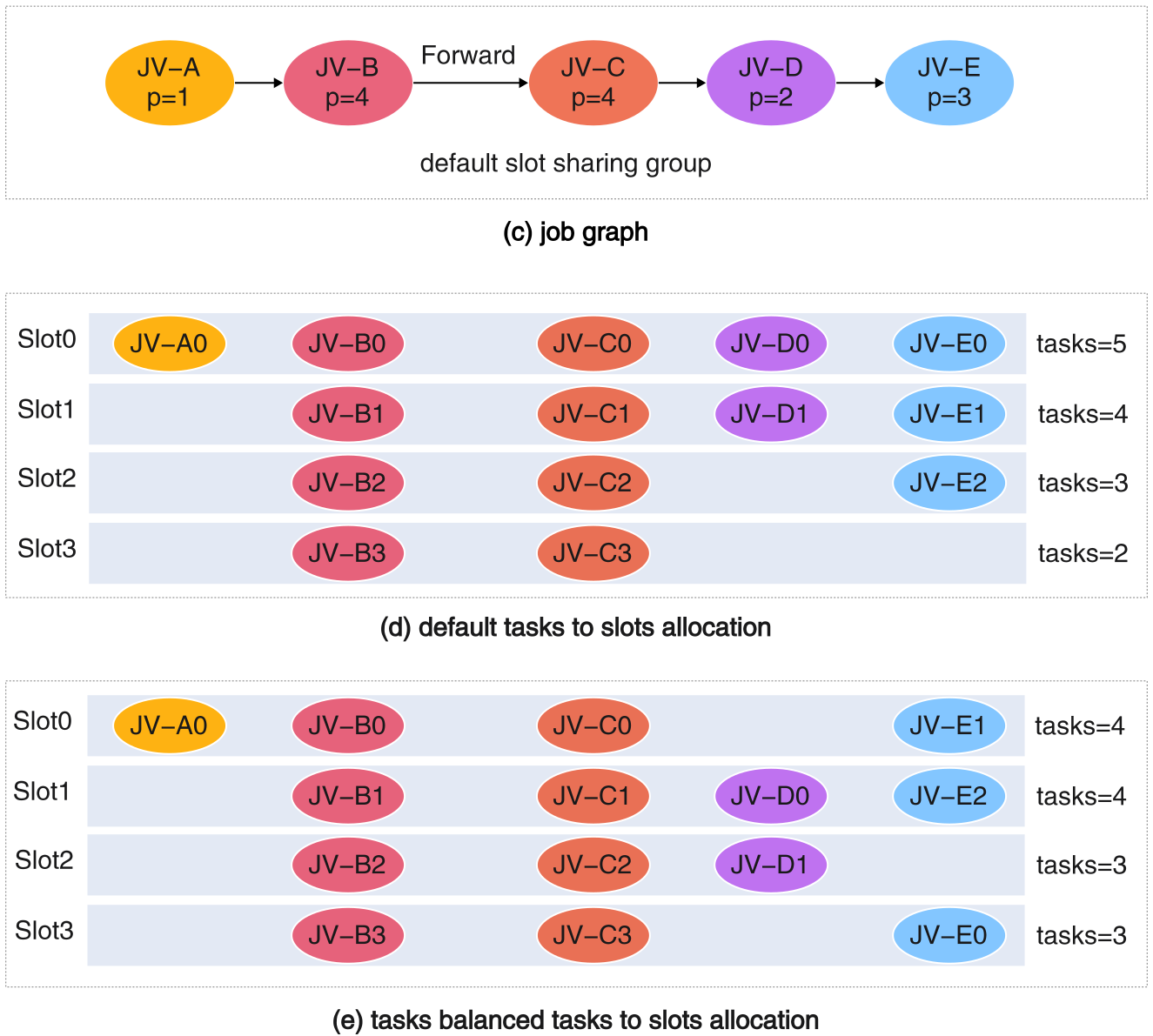
During the tasks-to-slots assignment phase, this tasks scheduling strategy:
-
First directly assigns the tasks of the vertices with the highest parallelism to the
i-thslot.That is, task
JV-Biis assigned directly tosloti, and taskJV-Ciis assigned directly tosloti. -
Next, for tasks belonging to job vertices with sub-maximal parallelism, they are assigned in a round-robin fashion across the slots within the current slot sharing group until all tasks are allocated.
As shown in figure (e), under the task-quantity-based assignment strategy, the range (max-min difference) of the number of tasks per slot is 1,
which is better than the range of 3 under the default strategy shown in figure (d).
Thus, this ensures a more balanced distribution of the number of tasks across slots.
The slots-to-TaskManagers assignment phase #
As shown in figure (f), given a Flink job comprising two vertices, JV-A and JV-B, with parallelism of 6 and 3 respectively,
and both vertices sharing the same slot sharing group.
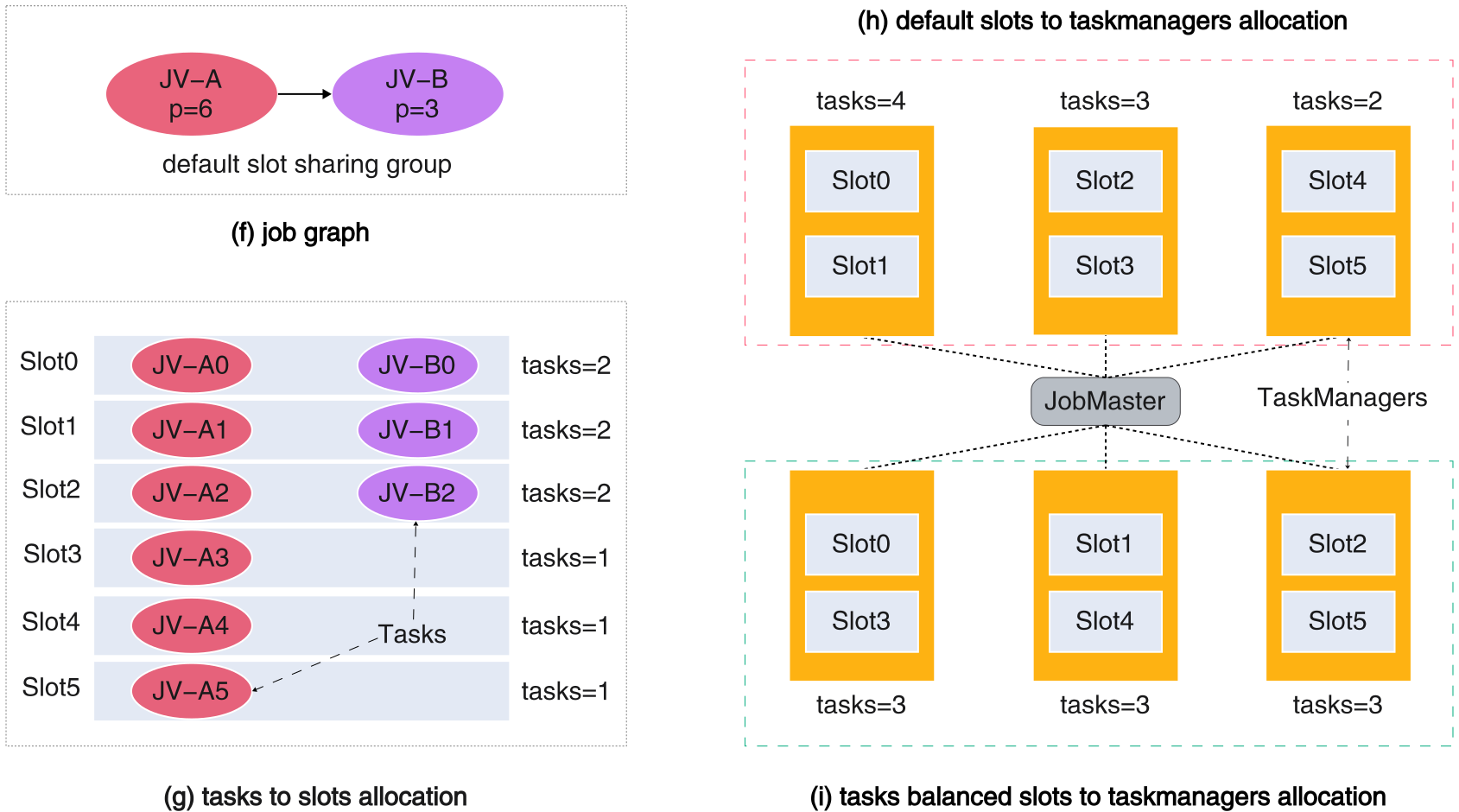
The assignment result after the first phase is shown in figure (g),
where Slot0, Slot1, and Slot2 each contain 2 tasks, while the remaining slots contain 1 task each.
Subsequently:
- The strategy submits all slot requests and waits until all slot resources required for the current job are ready.
Once the slot resources are ready:
- The strategy then sorts all slot requests in descending order based on the number of tasks contained in each request.
Afterward, it sequentially assigns each slot request to the
TaskManagerwith the smallest current tasks loading. This process continues until all slot requests have been allocated.
The final assignment result is shown in figure (i), where each TaskManager ends up with exactly 3 tasks,
resulting in a task count difference of 0 between TaskManagers. In contrast, the scheduling result under the default strategy,
shown in figure (h), has a task count difference of 2 between TaskManagers.
Therefore, if you are seeing performance bottlenecks of the sort described above, then using this load balancing tasks scheduling strategy can improve performance. Be aware that you should not use this strategy, if you are not seeing these bottlenecks, as you may experience performance degradation.
Usage #
You can enable balanced tasks scheduling through the following configuration item:
taskmanager.load-balance.mode:tasks
More details #
See the FLIP-370 for more details.