This documentation is for an unreleased version of Apache Flink. We recommend you use the latest stable version.
Python User-defined Functions
Python User-defined Functions #
User-defined functions are important features, because they significantly extend the expressiveness of Python Table API programs.
NOTE: Python UDF execution requires Python version (3.9, 3.10, 3.11 or 3.12) with PyFlink installed. It’s required on both the client side and the cluster side.
Scalar Functions #
It supports to use Python scalar functions in Python Table API programs. In order to define a Python scalar function,
one can extend the base class ScalarFunction in pyflink.table.udf and implement an evaluation method.
The behavior of a Python scalar function is defined by the evaluation method which is named eval.
The evaluation method can support variable arguments, such as eval(*args).
The following example shows how to define your own Python hash code function, register it in the TableEnvironment, and call it in a query. Note that you can configure your scalar function via a constructor before it is registered:
from pyflink.table.expressions import call, col
from pyflink.table import DataTypes, TableEnvironment, EnvironmentSettings
from pyflink.table.udf import ScalarFunction, udf

class HashCode(ScalarFunction):
  def __init__(self):
    self.factor = 12

  def eval(self, s):
    return hash(s) * self.factor

settings = EnvironmentSettings.in_batch_mode()
table_env = TableEnvironment.create(settings)

hash_code = udf(HashCode(), result_type='BIGINT')

# use the Python function in Python Table API
my_table.select(col("string"), col("bigint"), hash_code(col("bigint")), call(hash_code, col("bigint")))

# use the Python function in SQL API
table_env.create_temporary_function("hash_code", udf(HashCode(), result_type='BIGINT'))
table_env.sql_query("SELECT string, bigint, hash_code(bigint) FROM MyTable")
It also supports to use Java/Scala scalar functions in Python Table API programs.
'''
Java code:

// The Java class must have a public no-argument constructor and can be founded in current Java classloader.
public class HashCode extends ScalarFunction {
  private int factor = 12;

  public int eval(String s) {
      return s.hashCode() * factor;
  }
}
'''
from pyflink.table.expressions import call, col
from pyflink.table import TableEnvironment, EnvironmentSettings

settings = EnvironmentSettings.in_batch_mode()
table_env = TableEnvironment.create(settings)

# register the Java function
table_env.create_java_temporary_function("hash_code", "my.java.function.HashCode")

# use the Java function in Python Table API
my_table.select(call('hash_code', col("string")))

# use the Java function in SQL API
table_env.sql_query("SELECT string, bigint, hash_code(string) FROM MyTable")
There are many ways to define a Python scalar function besides extending the base class ScalarFunction.
The following examples show the different ways to define a Python scalar function which takes two columns of
bigint as the input parameters and returns the sum of them as the result.
# option 1: extending the base class `ScalarFunction`
class Add(ScalarFunction):
  def eval(self, i, j):
    return i + j

add = udf(Add(), result_type=DataTypes.BIGINT())

# option 2: Python function
@udf(result_type='BIGINT')
def add(i, j):
  return i + j

# option 3: lambda function
add = udf(lambda i, j: i + j, result_type='BIGINT')

# option 4: callable function
class CallableAdd(object):
  def __call__(self, i, j):
    return i + j

add = udf(CallableAdd(), result_type='BIGINT')

# option 5: partial function
def partial_add(i, j, k):
  return i + j + k

add = udf(functools.partial(partial_add, k=1), result_type='BIGINT')

# register the Python function
table_env.create_temporary_function("add", add)
# use the function in Python Table API
my_table.select(call('add', col('a'), col('b')))

# You can also use the Python function in Python Table API directly
my_table.select(add(col('a'), col('b')))
Table Functions #
Similar to a Python user-defined scalar function, a user-defined table function takes zero, one, or multiple scalar values as input parameters. However in contrast to a scalar function, it can return an arbitrary number of rows as output instead of a single value. The return type of a Python UDTF could be of types Iterable, Iterator or generator.
The following example shows how to define your own Python multi emit function, register it in the TableEnvironment, and call it in a query.
from pyflink.table.expressions import col
from pyflink.table import DataTypes, TableEnvironment, EnvironmentSettings
from pyflink.table.udf import TableFunction, udtf

class Split(TableFunction):
    def eval(self, string):
        for s in string.split(" "):
            yield s, len(s)

env_settings = EnvironmentSettings.in_streaming_mode()
table_env = TableEnvironment.create(env_settings)
my_table = ...  # type: Table, table schema: [a: String]

# register the Python Table Function
split = udtf(Split(), result_types=['STRING', 'INT'])

# use the Python Table Function in Python Table API
my_table.join_lateral(split(col("a")).alias("word", "length"))
my_table.left_outer_join_lateral(split(col("a")).alias("word", "length"))

# use the Python Table function in SQL API
table_env.create_temporary_function("split", udtf(Split(), result_types=['STRING', 'INT']))
table_env.sql_query("SELECT a, word, length FROM MyTable, LATERAL TABLE(split(a)) as T(word, length)")
table_env.sql_query("SELECT a, word, length FROM MyTable LEFT JOIN LATERAL TABLE(split(a)) as T(word, length) ON TRUE")
It also supports to use Java/Scala table functions in Python Table API programs.
'''
Java code:

// The generic type "Tuple2<String, Integer>" determines the schema of the returned table as (String, Integer).
// The java class must have a public no-argument constructor and can be founded in current java classloader.
public class Split extends TableFunction<Tuple2<String, Integer>> {
    private String separator = " ";

    public void eval(String str) {
        for (String s : str.split(separator)) {
            // use collect(...) to emit a row
            collect(new Tuple2<String, Integer>(s, s.length()));
        }
    }
}
'''
from pyflink.table.expressions import call, col
from pyflink.table import TableEnvironment, EnvironmentSettings

env_settings = EnvironmentSettings.in_streaming_mode()
table_env = TableEnvironment.create(env_settings)
my_table = ...  # type: Table, table schema: [a: String]

# Register the java function.
table_env.create_java_temporary_function("split", "my.java.function.Split")

# Use the table function in the Python Table API. "alias" specifies the field names of the table.
my_table.join_lateral(call('split', col('a')).alias("word", "length")).select(col('a'), col('word'), col('length'))
my_table.left_outer_join_lateral(call('split', col('a')).alias("word", "length")).select(col('a'), col('word'), col('length'))

# Register the python function.

# Use the table function in SQL with LATERAL and TABLE keywords.
# CROSS JOIN a table function (equivalent to "join" in Table API).
table_env.sql_query("SELECT a, word, length FROM MyTable, LATERAL TABLE(split(a)) as T(word, length)")
# LEFT JOIN a table function (equivalent to "left_outer_join" in Table API).
table_env.sql_query("SELECT a, word, length FROM MyTable LEFT JOIN LATERAL TABLE(split(a)) as T(word, length) ON TRUE")
Like Python scalar functions, you can use the above five ways to define Python TableFunctions.
Note The only difference is that the return type of Python Table Functions needs to be an iterable, iterator or generator.
# option 1: generator function
@udtf(result_types='BIGINT')
def generator_func(x):
      yield 1
      yield 2

# option 2: return iterator
@udtf(result_types='BIGINT')
def iterator_func(x):
      return range(5)

# option 3: return iterable
@udtf(result_types='BIGINT')
def iterable_func(x):
      result = [1, 2, 3]
      return result
Aggregate Functions #
A user-defined aggregate function (UDAGG) maps scalar values of multiple rows to a new scalar value.
NOTE: Currently the general user-defined aggregate function is only supported in the GroupBy aggregation and Group Window Aggregation in streaming mode. For batch mode, it’s currently not supported and it is recommended to use the Vectorized Aggregate Functions.
The behavior of an aggregate function is centered around the concept of an accumulator. The accumulator is an intermediate data structure that stores the aggregated values until a final aggregation result is computed.
For each set of rows that need to be aggregated, the runtime will create an empty accumulator by calling
create_accumulator(). Subsequently, the accumulate(...) method of the aggregate function will be called for each input
row to update the accumulator. Currently after each row has been processed, the get_value(...) method of the
aggregate function will be called to compute the aggregated result.
The following example illustrates the aggregation process:
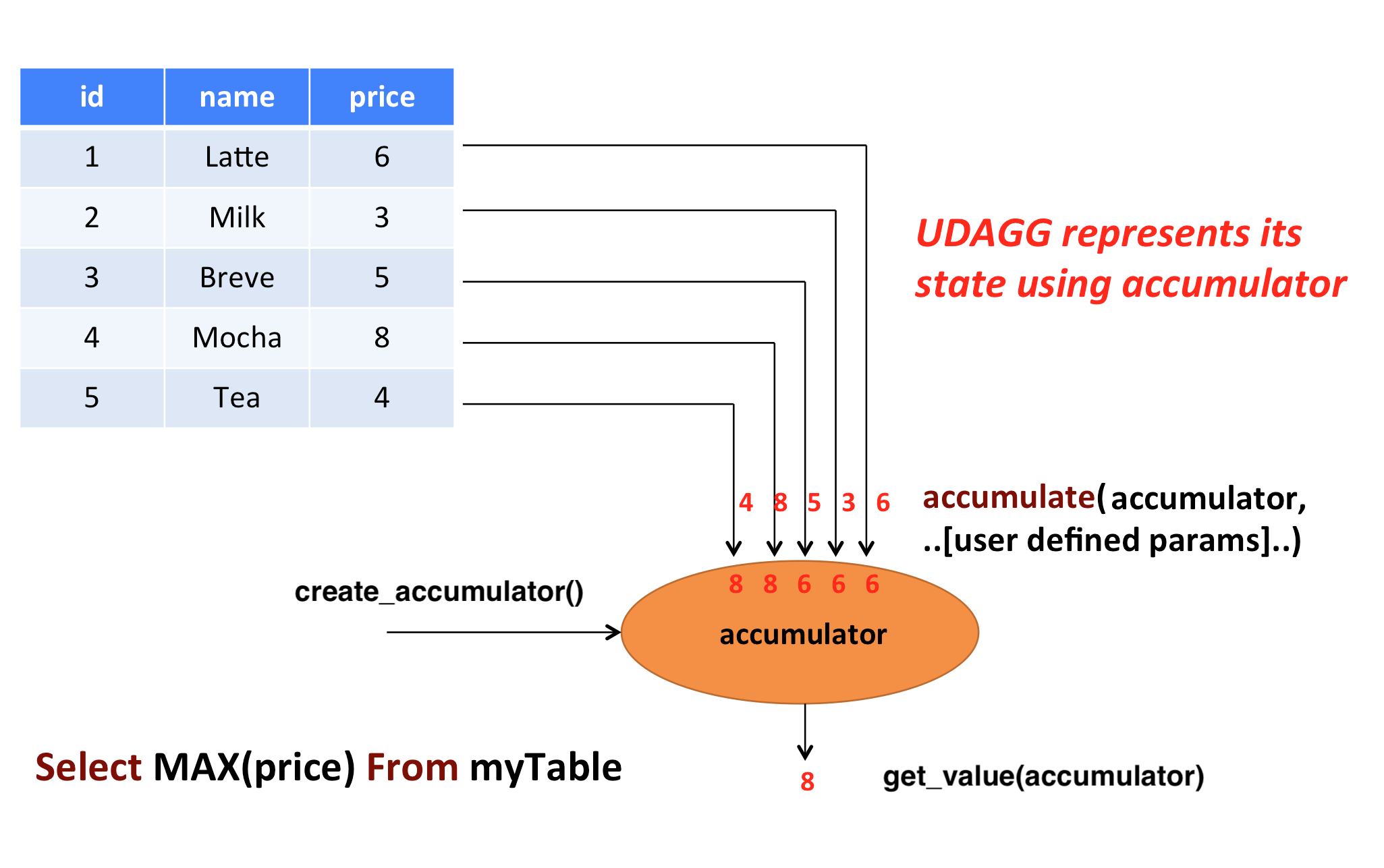
In the above example, we assume a table that contains data about beverages. The table consists of three columns (id, name,
and price) and 5 rows. We would like to find the highest price of all beverages in the table, i.e., perform
a max() aggregation.
In order to define an aggregate function, one has to extend the base class AggregateFunction in
pyflink.table and implement the evaluation method named accumulate(...).
The result type and accumulator type of the aggregate function can be specified by one of the following two approaches:
- Implement the method named
get_result_type()andget_accumulator_type(). - Wrap the function instance with the decorator
udafinpyflink.table.udfand specify the parametersresult_typeandaccumulator_type.
The following example shows how to define your own aggregate function and call it in a query.
from pyflink.common import Row
from pyflink.table import AggregateFunction, DataTypes, TableEnvironment, EnvironmentSettings
from pyflink.table.expressions import call
from pyflink.table.udf import udaf
from pyflink.table.expressions import col, lit
from pyflink.table.window import Tumble


class WeightedAvg(AggregateFunction):

    def create_accumulator(self):
        # Row(sum, count)
        return Row(0, 0)

    def get_value(self, accumulator):
        if accumulator[1] == 0:
            return None
        else:
            return accumulator[0] / accumulator[1]

    def accumulate(self, accumulator, value, weight):
        accumulator[0] += value * weight
        accumulator[1] += weight

    def retract(self, accumulator, value, weight):
        accumulator[0] -= value * weight
        accumulator[1] -= weight

    def get_result_type(self):
        return 'BIGINT'

    def get_accumulator_type(self):
        return 'ROW<f0 BIGINT, f1 BIGINT>'


env_settings = EnvironmentSettings.in_streaming_mode()
table_env = TableEnvironment.create(env_settings)
# the result type and accumulator type can also be specified in the udaf decorator:
# weighted_avg = udaf(WeightedAvg(), result_type=DataTypes.BIGINT(), accumulator_type=...)
weighted_avg = udaf(WeightedAvg())
t = table_env.from_elements([(1, 2, "Lee"),
                             (3, 4, "Jay"),
                             (5, 6, "Jay"),
                             (7, 8, "Lee")]).alias("value", "count", "name")

# call function "inline" without registration in Table API
result = t.group_by(col("name")).select(weighted_avg(col("value"), col("count")).alias("avg")).execute()
result.print()

# register function
table_env.create_temporary_function("weighted_avg", WeightedAvg())

# call registered function in Table API
result = t.group_by(col("name")).select(call("weighted_avg", col("value"), col("count")).alias("avg")).execute()
result.print()

# register table
table_env.create_temporary_view("source", t)

# call registered function in SQL
result = table_env.sql_query(
    "SELECT weighted_avg(`value`, `count`) AS avg FROM source GROUP BY name").execute()
result.print()

# use the general Python aggregate function in GroupBy Window Aggregation
tumble_window = Tumble.over(lit(1).hours) \
            .on(col("rowtime")) \
            .alias("w")

result = t.window(tumble_window) \
        .group_by(col('w'), col('name')) \
        .select(col('w').start, col('w').end, weighted_avg(col('value'), col('count'))) \
        .execute()
result.print()
The accumulate(...) method of our WeightedAvg class takes three input arguments. The first one is the accumulator
and the other two are user-defined inputs. In order to calculate a weighted average value, the accumulator
needs to store the weighted sum and count of all the data that have already been accumulated. In our example, we
use a Row object as the accumulator. Accumulators will be managed
by Flink’s checkpointing mechanism and are restored in case of failover to ensure exactly-once semantics.
Mandatory and Optional Methods #
The following methods are mandatory for each AggregateFunction:
create_accumulator()accumulate(...)get_value(...)
The following methods of AggregateFunction are required depending on the use case:
retract(...)is required when there are operations that could generate retraction messages before the current aggregation operation, e.g. group aggregate, outer join.
This method is optional, but it is strongly recommended to be implemented to ensure the UDAF can be used in any use case.merge(...)is required for session window ang hop window aggregations.get_result_type()andget_accumulator_type()is required if the result type and accumulator type would not be specified in theudafdecorator.
ListView and MapView #
If an accumulator needs to store large amounts of data, pyflink.table.ListView and pyflink.table.MapView
could be used instead of list and dict. These two data structures provide the similar functionalities as list and dict,
however usually having better performance by leveraging Flink’s state backend to eliminate unnecessary state access.
You can use them by declaring DataTypes.LIST_VIEW(...) and DataTypes.MAP_VIEW(...) in the accumulator type, e.g.:
from pyflink.table import ListView

class ListViewConcatAggregateFunction(AggregateFunction):

    def get_value(self, accumulator):
        # the ListView is iterable
        return accumulator[1].join(accumulator[0])

    def create_accumulator(self):
        return Row(ListView(), '')

    def accumulate(self, accumulator, *args):
        accumulator[1] = args[1]
        # the ListView support add, clear and iterate operations.
        accumulator[0].add(args[0])

    def get_accumulator_type(self):
        return DataTypes.ROW([
            # declare the first column of the accumulator as a string ListView.
            DataTypes.FIELD("f0", DataTypes.LIST_VIEW(DataTypes.STRING())),
            DataTypes.FIELD("f1", DataTypes.BIGINT())])

    def get_result_type(self):
        return DataTypes.STRING()
Currently there are 2 limitations to use the ListView and MapView:
- The accumulator must be a
Row. - The
ListViewandMapViewmust be the first level children of theRowaccumulator.
Please refer to the documentation of the corresponding classes for more information about this advanced feature.
NOTE: For reducing the data transmission cost between Python UDF worker and Java process caused by accessing the data in Flink states(e.g. accumulators and data views),
there is a cached layer between the raw state handler and the Python state backend. You can adjust the values of these configuration options to change the behavior of the cache layer for best performance:
python.state.cache-size, python.map-state.read-cache-size, python.map-state.write-cache-size, python.map-state.iterate-response-batch-size.
For more details please refer to the Python Configuration Documentation.
Table Aggregate Functions #
A user-defined table aggregate function (UDTAGG) maps scalar values of multiple rows to zero, one, or multiple rows (or structured types). The returned record may consist of one or more fields. If an output record consists of only a single field, the structured record can be omitted, and a scalar value can be emitted that will be implicitly wrapped into a row by the runtime.
NOTE: Currently the general user-defined table aggregate function is only supported in the GroupBy aggregation in streaming mode.
Similar to an aggregate function, the behavior of a table aggregate is centered around the concept of an accumulator. The accumulator is an intermediate data structure that stores the aggregated values until a final aggregation result is computed.
For each set of rows that needs to be aggregated, the runtime will create an empty accumulator by calling
create_accumulator(). Subsequently, the accumulate(...) method of the function is called for each
input row to update the accumulator. Once all rows have been processed, the emit_value(...) method of
the function is called to compute and return the final result.
The following example illustrates the aggregation process:
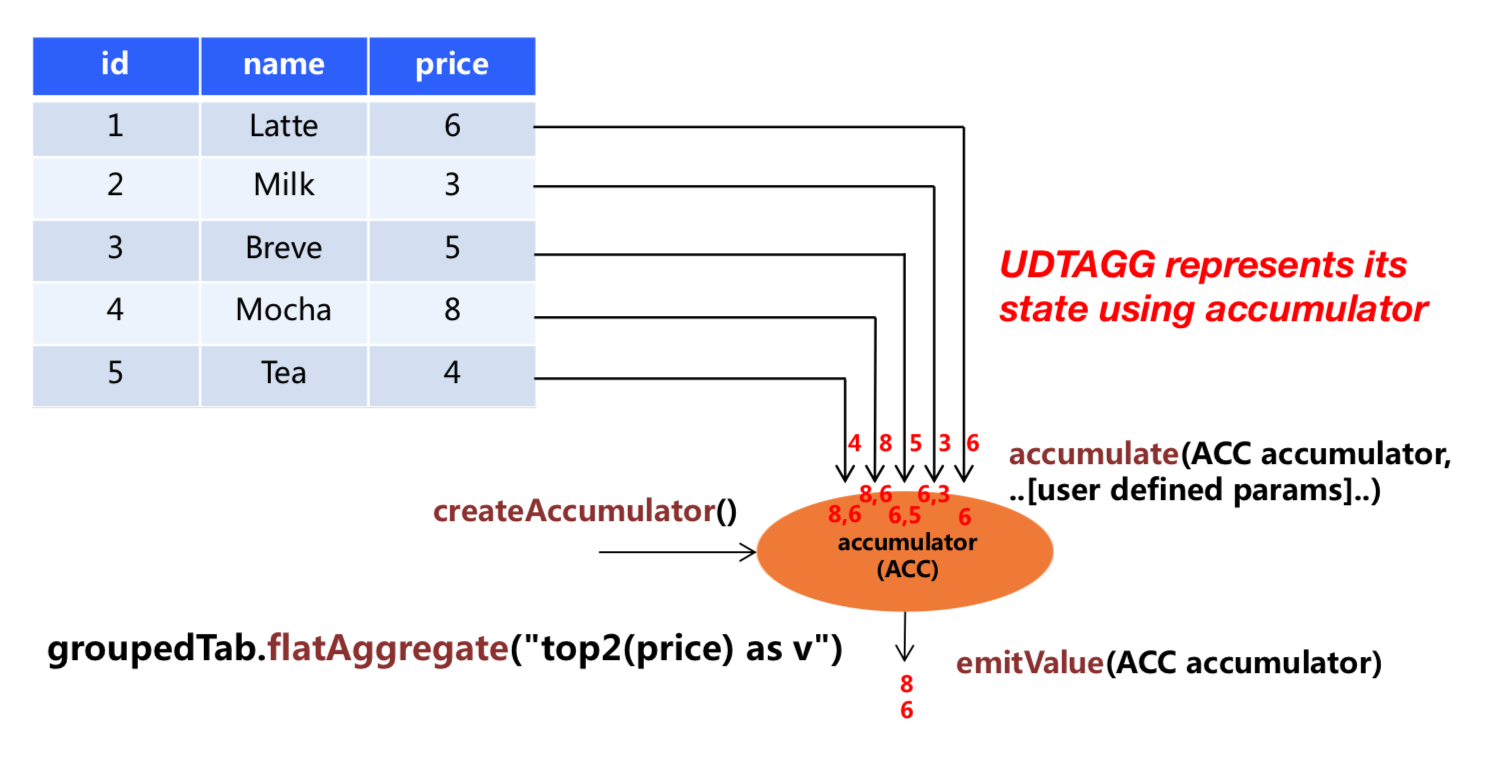
In the example, we assume a table that contains data about beverages. The table consists of three columns (id, name,
and price) and 5 rows. We would like to find the 2 highest prices of all beverages in the table, i.e.,
perform a TOP2() table aggregation. We need to consider each of the 5 rows. The result is a table
with the top 2 values.
In order to define a table aggregate function, one has to extend the base class TableAggregateFunction in
pyflink.table and implement one or more evaluation methods named accumulate(...).
The result type and accumulator type of the aggregate function can be specified by one of the following two approaches:
- Implement the method named
get_result_type()andget_accumulator_type(). - Wrap the function instance with the decorator
udtafinpyflink.table.udfand specify the parametersresult_typeandaccumulator_type.
The following example shows how to define your own aggregate function and call it in a query.
from pyflink.common import Row
from pyflink.table import DataTypes, TableEnvironment, EnvironmentSettings
from pyflink.table.expressions import col
from pyflink.table.udf import udtaf, TableAggregateFunction

class Top2(TableAggregateFunction):

    def emit_value(self, accumulator):
        yield Row(accumulator[0])
        yield Row(accumulator[1])

    def create_accumulator(self):
        return [None, None]

    def accumulate(self, accumulator, row):
        if row[0] is not None:
            if accumulator[0] is None or row[0] > accumulator[0]:
                accumulator[1] = accumulator[0]
                accumulator[0] = row[0]
            elif accumulator[1] is None or row[0] > accumulator[1]:
                accumulator[1] = row[0]

    def get_accumulator_type(self):
        return 'ARRAY<BIGINT>'

    def get_result_type(self):
        return 'ROW<a BIGINT>'


env_settings = EnvironmentSettings.in_streaming_mode()
table_env = TableEnvironment.create(env_settings)
# the result type and accumulator type can also be specified in the udtaf decorator:
# top2 = udtaf(Top2(), result_type=DataTypes.ROW([DataTypes.FIELD("a", DataTypes.BIGINT())]), accumulator_type=DataTypes.ARRAY(DataTypes.BIGINT()))
top2 = udtaf(Top2())
t = table_env.from_elements([(1, 'Hi', 'Hello'),
                             (3, 'Hi', 'hi'),
                             (5, 'Hi2', 'hi'),
                             (7, 'Hi', 'Hello'),
                             (2, 'Hi', 'Hello')],
                            ['a', 'b', 'c'])

# call function "inline" without registration in Table API
t.group_by(col('b')).flat_aggregate(top2).select(col('*')).execute().print()

# the result is:
#      b    a
# 0  Hi2  5.0
# 1  Hi2  NaN
# 2   Hi  7.0
# 3   Hi  3.0
The accumulate(...) method of our Top2 class takes two inputs. The first one is the accumulator
and the second one is the user-defined input. In order to calculate a result, the accumulator needs to
store the 2 highest values of all the data that has been accumulated. Accumulators are automatically managed
by Flink’s checkpointing mechanism and are restored in case of a failure to ensure exactly-once semantics.
The result values are emitted together with a ranking index.
Mandatory and Optional Methods #
The following methods are mandatory for each TableAggregateFunction:
create_accumulator()accumulate(...)emit_value(...)
The following methods of TableAggregateFunction are required depending on the use case:
retract(...)is required when there are operations that could generate retraction messages before the current aggregation operation, e.g. group aggregate, outer join.
This method is optional, but it is strongly recommended to be implemented to ensure the UDTAF can be used in any use case.get_result_type()andget_accumulator_type()is required if the result type and accumulator type would not be specified in theudtafdecorator.
ListView and MapView #
Similar to Aggregation function, we can also use ListView and MapView in Table Aggregate Function.
from pyflink.common import Row
from pyflink.table import ListView
from pyflink.table.types import DataTypes
from pyflink.table.udf import TableAggregateFunction

class ListViewConcatTableAggregateFunction(TableAggregateFunction):

    def emit_value(self, accumulator):
        result = accumulator[1].join(accumulator[0])
        yield Row(result)
        yield Row(result)

    def create_accumulator(self):
        return Row(ListView(), '')

    def accumulate(self, accumulator, *args):
        accumulator[1] = args[1]
        accumulator[0].add(args[0])

    def get_accumulator_type(self):
        return DataTypes.ROW([
            DataTypes.FIELD("f0", DataTypes.LIST_VIEW(DataTypes.STRING())),
            DataTypes.FIELD("f1", DataTypes.BIGINT())])

    def get_result_type(self):
        return DataTypes.ROW([DataTypes.FIELD("a", DataTypes.STRING())])
Vectorized User-defined Functions #
Vectorized Python user-defined functions are functions which are executed by transferring a batch of elements between JVM and Python VM in Arrow columnar format.
The performance of vectorized Python user-defined functions are usually much higher than non-vectorized Python user-defined functions as the serialization/deserialization
overhead and invocation overhead are much reduced. Besides, users could leverage the popular Python libraries such as Pandas, Numpy, etc for the vectorized Python user-defined functions implementation.
These Python libraries are highly optimized and provide high-performance data structures and functions. It shares the similar way as the
non-vectorized user-defined functions on how to define vectorized user-defined functions.
Users only need to add an extra parameter func_type="pandas" in the decorator udf or udaf to mark it as a vectorized user-defined function.
Vectorized Scalar Functions #
Vectorized Python scalar functions take pandas.Series as the inputs and return a pandas.Series of the same length as the output.
Internally, Flink will split the input elements into batches, convert a batch of input elements into Pandas.Series
and then call user-defined vectorized Python scalar functions for each batch of input elements. Please refer to the config option
python.fn-execution.arrow.batch.size for more details
on how to configure the batch size.
Vectorized Python scalar function could be used in any places where non-vectorized Python scalar functions could be used.
The following example shows how to define your own vectorized Python scalar function which computes the sum of two columns, and use it in a query:
from pyflink.table import TableEnvironment, EnvironmentSettings
from pyflink.table.expressions import col
from pyflink.table.udf import udf

@udf(result_type='BIGINT', func_type="pandas")
def add(i, j):
  return i + j

settings = EnvironmentSettings.in_batch_mode()
table_env = TableEnvironment.create(settings)

# use the vectorized Python scalar function in Python Table API
my_table.select(add(col("bigint"), col("bigint")))

# use the vectorized Python scalar function in SQL API
table_env.create_temporary_function("add", add)
table_env.sql_query("SELECT add(bigint, bigint) FROM MyTable")
Vectorized Aggregate Functions #
Vectorized Python aggregate functions takes one or more pandas.Series as the inputs and return one scalar value as output.
Note The return type does not support RowType and MapType for the time being.
Vectorized Python aggregate function could be used in GroupBy Aggregation(Batch), GroupBy Window Aggregation(Batch and Stream) and
Over Window Aggregation(Batch and Stream bounded over window). For more details on the usage of Aggregations, you can refer
to the relevant documentation.
Note Pandas UDAF does not support partial aggregation. Besides, all the data for a group or window will be loaded into memory at the same time during execution and so you must make sure that the data of a group or window could fit into the memory.
The following example shows how to define your own vectorized Python aggregate function which computes mean,
and use it in GroupBy Aggregation, GroupBy Window Aggregation and Over Window Aggregation:
from pyflink.table import TableEnvironment, EnvironmentSettings
from pyflink.table.expressions import col, lit
from pyflink.table.udf import udaf
from pyflink.table.window import Tumble

@udaf(result_type='FLOAT', func_type="pandas")
def mean_udaf(v):
    return v.mean()

settings = EnvironmentSettings.in_batch_mode()
table_env = TableEnvironment.create(settings)

my_table = ...  # type: Table, table schema: [a: String, b: BigInt, c: BigInt]

# use the vectorized Python aggregate function in GroupBy Aggregation
my_table.group_by(col('a')).select(col('a'), mean_udaf(col('b')))


# use the vectorized Python aggregate function in GroupBy Window Aggregation
tumble_window = Tumble.over(lit(1).hours) \
            .on(col("rowtime")) \
            .alias("w")

my_table.window(tumble_window) \
    .group_by(col("w")) \
    .select(col('w').start, col('w').end, mean_udaf(col('b')))

# use the vectorized Python aggregate function in Over Window Aggregation
table_env.create_temporary_function("mean_udaf", mean_udaf)
table_env.sql_query("""
    SELECT a,
        mean_udaf(b)
        over (PARTITION BY a ORDER BY rowtime
        ROWS BETWEEN UNBOUNDED preceding AND UNBOUNDED FOLLOWING)
    FROM MyTable""")
There are many ways to define a vectorized Python aggregate functions. The following examples show the different ways to define a vectorized Python aggregate function which takes two columns of bigint as the inputs and returns the sum of the maximum of them as the result.
from pyflink.table.udf import AggregateFunction, udaf

# option 1: extending the base class `AggregateFunction`
class MaxAdd(AggregateFunction):

    def open(self, function_context):
        mg = function_context.get_metric_group()
        self.counter = mg.add_group("key", "value").counter("my_counter")
        self.counter_sum = 0

    def get_value(self, accumulator):
        # counter
        self.counter.inc(10)
        self.counter_sum += 10
        return accumulator[0]

    def create_accumulator(self):
        return []

    def accumulate(self, accumulator, *args):
        result = 0
        for arg in args:
            result += arg.max()
        accumulator.append(result)

max_add = udaf(MaxAdd(), result_type='BIGINT', func_type="pandas")

# option 2: Python function
@udaf(result_type='BIGINT', func_type="pandas")
def max_add(i, j):
  return i.max() + j.max()

# option 3: lambda function
max_add = udaf(lambda i, j: i.max() + j.max(), result_type='BIGINT', func_type="pandas")

# option 4: callable function
class CallableMaxAdd(object):
  def __call__(self, i, j):
    return i.max() + j.max()

max_add = udaf(CallableMaxAdd(), result_type='BIGINT', func_type="pandas")

# option 5: partial function
def partial_max_add(i, j, k):
  return i.max() + j.max() + k

max_add = udaf(functools.partial(partial_max_add, k=1), result_type='BIGINT', func_type="pandas")
Bundling UDFs #
To run Python UDFs (as well as Pandas UDFs) in any non-local mode, it is strongly recommended
bundling your Python UDF definitions using the config option python-files,
if your Python UDFs live outside the file where the main() function is defined.
Otherwise, you may run into ModuleNotFoundError: No module named 'my_udf'
if you define Python UDFs in a file called my_udf.py.
Loading resources in UDFs #
There are scenarios when you want to load some resources in UDFs first, then running computation
(i.e., eval) over and over again, without having to re-load the resources.
For example, you may want to load a large deep learning model only once,
then run batch prediction against the model multiple times.
Overriding the open method of UserDefinedFunction is exactly what you need.
class Predict(ScalarFunction):
    def open(self, function_context):
        import pickle

        with open("resources.zip/resources/model.pkl", "rb") as f:
            self.model = pickle.load(f)

    def eval(self, x):
        return self.model.predict(x)

predict = udf(Predict(), result_type=DataTypes.DOUBLE(), func_type="pandas")
Accessing job parameters #
The open() method provides a FunctionContext that contains information about the context in which
user-defined functions are executed, such as the metric group, the global job parameters, etc.
The following information can be obtained by calling the corresponding methods of FunctionContext:
| Method | Description |
|---|---|
get_metric_group() |
Metric group for this parallel subtask. |
get_job_parameter(name, default_value) |
Global job parameter value associated with given key. |
class HashCode(ScalarFunction):

    def open(self, function_context: FunctionContext):
        # access the global "hashcode_factor" parameter
        # "12" would be the default value if the parameter does not exist
        self.factor = int(function_context.get_job_parameter("hashcode_factor", "12"))

    def eval(self, s: str):
        return hash(s) * self.factor

hash_code = udf(HashCode(), result_type=DataTypes.INT())
TableEnvironment t_env = TableEnvironment.create(...)
t_env.get_config().set('pipeline.global-job-parameters', 'hashcode_factor:31')
t_env.create_temporary_system_function("hashCode", hash_code)
t_env.sql_query("SELECT myField, hashCode(myField) FROM MyTable")
Testing User-Defined Functions #
Suppose you have defined a Python user-defined function as following:
add = udf(lambda i, j: i + j, result_type=DataTypes.BIGINT())
To unit test it, you need to extract the original Python function using ._func and then unit test it:
f = add._func
assert f(1, 2) == 3