This documentation is for an unreleased version of Apache Flink. We recommend you use the latest stable version.
DataStream API Tutorial
DataStream API Tutorial #
Apache Flink offers a DataStream API as its lowest-level stream processing API. The DataStream API gives you fine-grained control over state, time, and custom processing logic. This makes it ideal for building advanced event-driven applications.
What You’ll Build #
In this tutorial, you will build a fraud detection system that processes credit card transactions:
Transactions (source) → Flink (KeyedProcessFunction) → Alerts (sink)
You’ll learn how to:
- Set up a DataStream execution environment
- Create sources for data ingestion
- Partition streams with
keyByfor parallel processing - Implement business logic with
KeyedProcessFunction - Use managed state (
ValueState) for fault-tolerant processing
Prerequisites #
This walkthrough assumes that you have some familiarity with Java or Python, but you should be able to follow along even if you come from a different programming language.
Help, I’m Stuck! #
If you get stuck, check out the community support resources. In particular, Apache Flink’s user mailing list consistently ranks as one of the most active of any Apache project and a great way to get help quickly.
How To Follow Along #
If you want to follow along, you will require a computer with:
- Java 11, 17, or 21
- Maven
- Java 11, 17, or 21
- Python 3.9, 3.10, 3.11, or 3.12
A provided Flink Maven Archetype will create a skeleton project with all the necessary dependencies quickly, so you only need to focus on filling out the business logic.
These dependencies include flink-streaming-java which is the core dependency for all Flink streaming applications and flink-walkthrough-common that has data generators and other classes specific to this walkthrough.
Attention: The Maven archetype is only available for released versions of Apache Flink.
Since you are currently looking at the latest SNAPSHOT version of the documentation, all version references below will not work. Please switch the documentation to the latest released version via the release picker which you find on the left side below the menu.
$ mvn archetype:generate \
    -DarchetypeGroupId=org.apache.flink \
    -DarchetypeArtifactId=flink-walkthrough-datastream-java \
    -DarchetypeVersion=2.3-SNAPSHOT \
    -DgroupId=frauddetection \
    -DartifactId=frauddetection \
    -Dversion=0.1 \
    -Dpackage=frauddetection \
    -DinteractiveMode=false
You can edit the groupId, artifactId and package if you like. With the above parameters, Maven will create a folder named frauddetection that contains a project with all the dependencies to complete this tutorial.
After importing the project into your editor, you can find a file FraudDetectionJob.java with the following code which you can run directly inside your IDE.
Running in an IDE: If you encounter a
java.lang.NoClassDefFoundErrorexception, this is likely because you do not have all required Flink dependencies on the classpath.
- IntelliJ IDEA: Go to Run > Edit Configurations > Modify options > Select “include dependencies with ‘Provided’ scope”.
Using Python DataStream API requires installing PyFlink, which is available on PyPI and can be easily installed using pip:
$ python -m pip install apache-flink
Tip: We recommend installing PyFlink in a virtual environment to keep your project dependencies isolated.
Once PyFlink is installed, create a new file called fraud_detection.py where you will write the DataStream program.
The Complete Program #
Here is the complete code for the fraud detection program:
public class FraudDetectionJob {

    public static void main(String[] args) throws Exception {
        StreamExecutionEnvironment env = StreamExecutionEnvironment.getExecutionEnvironment();

        DataStream<Transaction> transactions = env
            .fromSource(
                TransactionSource.unbounded(),
                WatermarkStrategy.noWatermarks(),
                "transactions");

        DataStream<Alert> alerts = transactions
            .keyBy(Transaction::getAccountId)
            .process(new FraudDetector())
            .name("fraud-detector");

        alerts
            .addSink(new AlertSink())
            .name("send-alerts");

        env.execute("Fraud Detection");
    }
}
public class FraudDetector extends KeyedProcessFunction<Long, Transaction, Alert> {

    private static final long serialVersionUID = 1L;

    private static final double SMALL_AMOUNT = 1.00;
    private static final double LARGE_AMOUNT = 500.00;

    private transient ValueState<Boolean> flagState;

    @Override
    public void open(OpenContext openContext) {
        ValueStateDescriptor<Boolean> flagDescriptor = new ValueStateDescriptor<>(
                "flag",
                Types.BOOLEAN);
        flagState = getRuntimeContext().getState(flagDescriptor);
    }

    @Override
    public void processElement(
            Transaction transaction,
            Context context,
            Collector<Alert> collector) throws Exception {

        Boolean lastTransactionWasSmall = flagState.value();

        if (lastTransactionWasSmall != null) {
            if (transaction.getAmount() > LARGE_AMOUNT) {
                Alert alert = new Alert();
                alert.setId(transaction.getAccountId());
                collector.collect(alert);
            }
            flagState.clear();
        }

        if (transaction.getAmount() < SMALL_AMOUNT) {
            flagState.update(true);
        }
    }
}
from pyflink.common.typeinfo import Types
from pyflink.datastream import StreamExecutionEnvironment
from pyflink.datastream.functions import KeyedProcessFunction, RuntimeContext
from pyflink.datastream.state import ValueStateDescriptor


class FraudDetector(KeyedProcessFunction):

    SMALL_AMOUNT = 1.00
    LARGE_AMOUNT = 500.00

    def __init__(self):
        self.flag_state = None

    def open(self, runtime_context: RuntimeContext):
        descriptor = ValueStateDescriptor("flag", Types.BOOLEAN())
        self.flag_state = runtime_context.get_state(descriptor)

    def process_element(self, transaction, ctx: 'KeyedProcessFunction.Context'):
        # transaction is a tuple: (account_id, timestamp, amount)
        account_id = transaction[0]
        amount = transaction[2]

        last_transaction_was_small = self.flag_state.value()

        if last_transaction_was_small is not None:
            if amount > self.LARGE_AMOUNT:
                yield f"Alert{{id={account_id}}}"
            self.flag_state.clear()

        if amount < self.SMALL_AMOUNT:
            self.flag_state.update(True)


def fraud_detection():
    env = StreamExecutionEnvironment.get_execution_environment()
    env.set_parallelism(1)

    # Sample transaction data: (account_id, timestamp, amount)
    transactions_data = [
        (1, 1000, 188.23),
        (2, 1001, 0.50),    # Small transaction
        (2, 1002, 600.00),  # Large transaction - ALERT!
        (3, 1003, 42.00),
        (1, 1004, 0.89),    # Small transaction
        (1, 1005, 300.00),  # Not large enough - no alert
        (4, 1006, 0.10),    # Small transaction
        (4, 1007, 520.00),  # Large transaction - ALERT!
        (3, 1008, 0.75),    # Small transaction
        (3, 1009, 800.00),  # Large transaction - ALERT!
    ]

    transactions = env.from_collection(
        transactions_data,
        type_info=Types.TUPLE([Types.LONG(), Types.LONG(), Types.DOUBLE()])
    )

    alerts = transactions \
        .key_by(lambda t: t[0]) \
        .process(FraudDetector())

    alerts.print()

    env.execute("Fraud Detection")


if __name__ == '__main__':
    fraud_detection()
Breaking Down The Code #
Let’s walk step-by-step through the code. The main class defines the data flow of the application and the FraudDetector class defines the business logic of the function that detects fraudulent transactions.
The Execution Environment #
The first line sets up your StreamExecutionEnvironment. The execution environment is how you set properties for your Job, create your sources, and trigger the execution of the Job.
StreamExecutionEnvironment env = StreamExecutionEnvironment.getExecutionEnvironment();
env = StreamExecutionEnvironment.get_execution_environment()
Creating a Source #
Sources ingest data from external systems, such as Apache Kafka, Rabbit MQ, or Apache Pulsar, into Flink Jobs.
This walkthrough uses TransactionSource, which wraps a DataGeneratorSource to generate an infinite stream of credit card transactions for you to process. Each transaction contains an account ID (accountId), timestamp (timestamp) of when the transaction occurred, and amount (amount).
DataStream<Transaction> transactions = env
    .fromSource(
        TransactionSource.unbounded(),
        WatermarkStrategy.noWatermarks(),
        "transactions");
The fromSource method takes three parameters: the source itself, a watermark strategy (this example uses noWatermarks() since it uses processing time), and a name for debugging purposes.
This walkthrough uses a collection of sample transaction data. Each transaction is a tuple containing an account ID, timestamp, and amount.
transactions_data = [
    (1, 1000, 188.23),
    (2, 1001, 0.50),    # Small transaction
    (2, 1002, 600.00),  # Large transaction - ALERT!
    # ...more transactions
]

transactions = env.from_collection(
    transactions_data,
    type_info=Types.TUPLE([Types.LONG(), Types.LONG(), Types.DOUBLE()])
)
In a production system, you would use a source connector like Kafka. The from_collection method is convenient for testing and tutorials.
Partitioning Events & Detecting Fraud #
The transactions stream contains a lot of transactions from a large number of users, such that it needs to be processed in parallel by multiple fraud detection tasks. Since fraud occurs on a per-account basis, you must ensure that all transactions for the same account are processed by the same parallel task of the fraud detector operator.
To ensure that the same physical task processes all records for a particular key, you can partition a stream using keyBy. The process() call adds an operator that applies a function to each partitioned element in the stream. It is common to say the operator immediately after a keyBy, in this case FraudDetector, is executed within a keyed context.
DataStream<Alert> alerts = transactions
    .keyBy(Transaction::getAccountId)
    .process(new FraudDetector())
    .name("fraud-detector");
alerts = transactions \
    .key_by(lambda t: t[0]) \
    .process(FraudDetector())
Outputting Results #
A sink writes a DataStream to an external system, such as Apache Kafka, Cassandra, or AWS Kinesis.
The AlertSink logs each Alert record with log level INFO, instead of writing it to persistent storage, so you can easily see your results.
alerts.addSink(new AlertSink());
The print() method outputs alerts to the console for easy viewing.
alerts.print()
The Fraud Detector #
The fraud detector is implemented as a KeyedProcessFunction. Its processElement method is called for every transaction event. This first version produces an alert on every transaction, which some may say is overly conservative.
The next section will guide you to expand the fraud detector with more meaningful business logic.
public class FraudDetector extends KeyedProcessFunction<Long, Transaction, Alert> {

    private static final double SMALL_AMOUNT = 1.00;
    private static final double LARGE_AMOUNT = 500.00;

    @Override
    public void processElement(
            Transaction transaction,
            Context context,
            Collector<Alert> collector) throws Exception {

        Alert alert = new Alert();
        alert.setId(transaction.getAccountId());

        collector.collect(alert);
    }
}
class FraudDetector(KeyedProcessFunction):

    SMALL_AMOUNT = 1.00
    LARGE_AMOUNT = 500.00

    def process_element(self, transaction, ctx: 'KeyedProcessFunction.Context'):
        account_id = transaction[0]
        yield f"Alert{{id={account_id}}}"
Implementing the Business Logic #
For the first version, the fraud detector should output an alert for any account that makes a small transaction immediately followed by a large one. Where small is anything less than 1.00 and large is more than 500.
Imagine your fraud detector processes the following stream of transactions for a particular account.
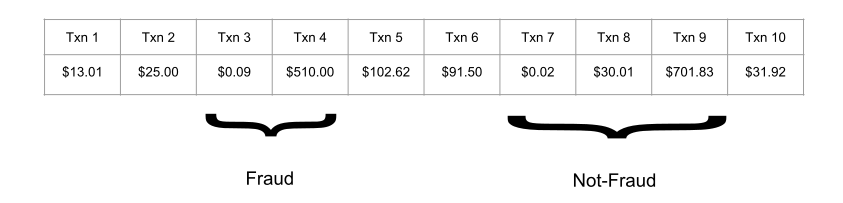
Transactions 3 and 4 should be marked as fraudulent because it is a small transaction, 0.09, followed by a large one, 510. Alternatively, transactions 7, 8, and 9 are not fraud because the small amount of 0.02 is not immediately followed by the large one; instead, there is an intermediate transaction that breaks the pattern.
To do this, the fraud detector must remember information across events; a large transaction is only fraudulent if the previous one was small. Remembering information across events requires state, and that is why this tutorial uses a KeyedProcessFunction. It provides fine-grained control over both state and time, which will allow you to evolve the algorithm with more complex requirements.
The most straightforward implementation is a boolean flag that is set whenever a small transaction is processed. When a large transaction comes through, you can simply check if the flag is set for that account.
However, merely implementing the flag as a member variable in the FraudDetector class will not work. Flink processes the transactions of multiple accounts with the same object instance of FraudDetector, which means if accounts A and B are routed through the same instance of FraudDetector, a transaction for account A could set the flag to true, and then a transaction for account B could set off a false alert. You could of course use a data structure like a Map to keep track of the flags for individual keys, however, a simple member variable would not be fault-tolerant and all its information would be lost in case of a failure. Hence, the fraud detector would possibly miss alerts if the application ever had to restart to recover from a failure.
To address these challenges, Flink provides primitives for a fault-tolerant state that are almost as easy to use as regular member variables.
The most basic type of state in Flink is ValueState, a data type that adds fault tolerance to any variable it wraps. ValueState is a form of keyed state, meaning it is only available in operators that are applied in a keyed context; any operator immediately following keyBy. A keyed state of an operator is automatically scoped to the key of the record that is currently processed. In this example, the key is the account id for the current transaction (as declared by keyBy()), and FraudDetector maintains an independent state for each account.
ValueState is created using a ValueStateDescriptor which contains metadata about how Flink should manage the variable. The state should be registered before the function starts processing data. The right hook for this is the open() method.
public class FraudDetector extends KeyedProcessFunction<Long, Transaction, Alert> {

    private static final long serialVersionUID = 1L;

    private transient ValueState<Boolean> flagState;

    @Override
    public void open(OpenContext openContext) {
        ValueStateDescriptor<Boolean> flagDescriptor = new ValueStateDescriptor<>(
                "flag",
                Types.BOOLEAN);
        flagState = getRuntimeContext().getState(flagDescriptor);
    }
class FraudDetector(KeyedProcessFunction):

    def __init__(self):
        self.flag_state = None

    def open(self, runtime_context: RuntimeContext):
        descriptor = ValueStateDescriptor("flag", Types.BOOLEAN())
        self.flag_state = runtime_context.get_state(descriptor)
ValueState is a wrapper class, similar to AtomicReference or AtomicLong in the Java standard library. It provides three methods for interacting with its contents; update sets the state, value gets the current value, and clear deletes its contents. If the state for a particular key is empty, such as at the beginning of an application or after calling clear, then value will return null (Java) or None (Python). Modifications to the object returned by value are not guaranteed to be recognized by the system, and so all changes must be performed with update. Otherwise, fault tolerance is managed automatically by Flink under the hood, and so you can interact with it like with any standard variable.
Below, you can see an example of how you can use a flag state to track potential fraudulent transactions.
@Override
public void processElement(
        Transaction transaction,
        Context context,
        Collector<Alert> collector) throws Exception {

    // Get the current state for the current key
    Boolean lastTransactionWasSmall = flagState.value();

    // Check if the flag is set
    if (lastTransactionWasSmall != null) {
        if (transaction.getAmount() > LARGE_AMOUNT) {
            // Output an alert downstream
            Alert alert = new Alert();
            alert.setId(transaction.getAccountId());

            collector.collect(alert);
        }

        // Clean up our state
        flagState.clear();
    }

    if (transaction.getAmount() < SMALL_AMOUNT) {
        // Set the flag to true
        flagState.update(true);
    }
}
def process_element(self, transaction, ctx: 'KeyedProcessFunction.Context'):
    account_id = transaction[0]
    amount = transaction[2]

    # Get the current state for the current key
    last_transaction_was_small = self.flag_state.value()

    # Check if the flag is set
    if last_transaction_was_small is not None:
        if amount > self.LARGE_AMOUNT:
            # Output an alert downstream
            yield f"Alert{{id={account_id}}}"

        # Clean up our state
        self.flag_state.clear()

    if amount < self.SMALL_AMOUNT:
        # Set the flag to true
        self.flag_state.update(True)
For every transaction, the fraud detector checks the state of the flag for that account. Remember, ValueState is always scoped to the current key, i.e., account. If the flag is non-null, then the last transaction seen for that account was small, and so if the amount for this transaction is large, then the detector outputs a fraud alert.
After that check, the flag state is unconditionally cleared. Either the current transaction caused a fraud alert, and the pattern is over, or the current transaction did not cause an alert, and the pattern is broken and needs to be restarted.
Finally, the transaction amount is checked to see if it is small. If so, then the flag is set so that it can be checked by the next event. Notice that ValueState<Boolean> has three states, unset (null/None), true/True, and false/False, because all ValueStates are nullable. This job only makes use of unset and true to check whether the flag is set or not.
Complete Implementation #
Here is the complete FraudDetector implementation with stateful fraud detection:
import org.apache.flink.api.common.functions.OpenContext;
import org.apache.flink.api.common.state.ValueState;
import org.apache.flink.api.common.state.ValueStateDescriptor;
import org.apache.flink.api.common.typeinfo.Types;
import org.apache.flink.streaming.api.functions.KeyedProcessFunction;
import org.apache.flink.util.Collector;
import org.apache.flink.walkthrough.common.entity.Alert;
import org.apache.flink.walkthrough.common.entity.Transaction;

public class FraudDetector extends KeyedProcessFunction<Long, Transaction, Alert> {

    private static final long serialVersionUID = 1L;

    private static final double SMALL_AMOUNT = 1.00;
    private static final double LARGE_AMOUNT = 500.00;

    private transient ValueState<Boolean> flagState;

    @Override
    public void open(OpenContext openContext) {
        ValueStateDescriptor<Boolean> flagDescriptor = new ValueStateDescriptor<>(
                "flag",
                Types.BOOLEAN);
        flagState = getRuntimeContext().getState(flagDescriptor);
    }

    @Override
    public void processElement(
            Transaction transaction,
            Context context,
            Collector<Alert> collector) throws Exception {

        // Get the current state for the current key
        Boolean lastTransactionWasSmall = flagState.value();

        // Check if the flag is set
        if (lastTransactionWasSmall != null) {
            if (transaction.getAmount() > LARGE_AMOUNT) {
                // Output an alert downstream
                Alert alert = new Alert();
                alert.setId(transaction.getAccountId());

                collector.collect(alert);
            }

            // Clean up our state
            flagState.clear();
        }

        if (transaction.getAmount() < SMALL_AMOUNT) {
            // Set the flag to true
            flagState.update(true);
        }
    }
}
Here is the complete fraud detection program:
from pyflink.common.typeinfo import Types
from pyflink.datastream import StreamExecutionEnvironment
from pyflink.datastream.functions import KeyedProcessFunction, RuntimeContext
from pyflink.datastream.state import ValueStateDescriptor


class FraudDetector(KeyedProcessFunction):

    SMALL_AMOUNT = 1.00
    LARGE_AMOUNT = 500.00

    def __init__(self):
        self.flag_state = None

    def open(self, runtime_context: RuntimeContext):
        descriptor = ValueStateDescriptor("flag", Types.BOOLEAN())
        self.flag_state = runtime_context.get_state(descriptor)

    def process_element(self, transaction, ctx: 'KeyedProcessFunction.Context'):
        # transaction is a tuple: (account_id, timestamp, amount)
        account_id = transaction[0]
        amount = transaction[2]

        # Get the current state for the current key
        last_transaction_was_small = self.flag_state.value()

        # Check if the flag is set
        if last_transaction_was_small is not None:
            if amount > self.LARGE_AMOUNT:
                # Output an alert downstream
                yield f"Alert{{id={account_id}}}"

            # Clean up our state
            self.flag_state.clear()

        if amount < self.SMALL_AMOUNT:
            # Set the flag to true
            self.flag_state.update(True)


def fraud_detection():
    env = StreamExecutionEnvironment.get_execution_environment()
    env.set_parallelism(1)

    # Sample transaction data: (account_id, timestamp, amount)
    transactions_data = [
        (1, 1000, 188.23),
        (2, 1001, 0.50),    # Small transaction
        (2, 1002, 600.00),  # Large transaction - ALERT!
        (3, 1003, 42.00),
        (1, 1004, 0.89),    # Small transaction
        (1, 1005, 300.00),  # Not large enough - no alert
        (4, 1006, 0.10),    # Small transaction
        (4, 1007, 520.00),  # Large transaction - ALERT!
        (3, 1008, 0.75),    # Small transaction
        (3, 1009, 800.00),  # Large transaction - ALERT!
    ]

    transactions = env.from_collection(
        transactions_data,
        type_info=Types.TUPLE([Types.LONG(), Types.LONG(), Types.DOUBLE()])
    )

    alerts = transactions \
        .key_by(lambda t: t[0]) \
        .process(FraudDetector())

    alerts.print()

    env.execute("Fraud Detection")


if __name__ == '__main__':
    fraud_detection()
Running the Application #
And that’s it, a fully functional, stateful, distributed streaming application! The query continuously consumes transactions from the source, detects fraudulent patterns, and emits alerts. Since the input is unbounded (in the Java version), the query keeps running until it is manually stopped.
Run the FraudDetectionJob class in your IDE to see the streaming results. You should see output similar to:
2024-01-01 14:22:06,220 INFO  org.apache.flink.walkthrough.common.sink.AlertSink - Alert{id=3}
2024-01-01 14:22:11,383 INFO  org.apache.flink.walkthrough.common.sink.AlertSink - Alert{id=3}
2024-01-01 14:22:16,551 INFO  org.apache.flink.walkthrough.common.sink.AlertSink - Alert{id=3}
Run the program from the command line:
$ python fraud_detection.py
You should see output similar to:
Alert{id=2}
Alert{id=4}
Alert{id=3}
The command builds and runs your PyFlink program in a local mini cluster. You can also submit the Python DataStream program to a remote cluster. Refer to Job Submission Examples for more details.
Next Steps #
Congratulations on completing this tutorial! Here are some ways to continue learning:
Enhance the Fraud Detector #
The current implementation detects small-then-large transaction patterns, but real fraud detection often includes time constraints. For example, scammers typically don’t wait long between their test transaction and large purchase.
To learn how to add timers to your fraud detector (e.g., only flag transactions occurring within 1 minute of each other), see the Event-Driven Applications section in Learn Flink.
Learn More About DataStream #
- DataStream API Overview: Complete DataStream API reference
- Process Functions: Deep dive into KeyedProcessFunction and other process functions
- State & Fault Tolerance: Understanding managed state and checkpointing
Explore Other Tutorials #
- Flink SQL Tutorial: Interactive SQL queries without coding
- Table API Tutorial: Build streaming pipelines with the Table API
- Flink Operations Playground: Learn to operate Flink clusters
Production Deployment #
- Deployment Overview: Deploy Flink in production
- Connectors: Connect to Kafka, databases, filesystems, and more