This documentation is for an unreleased version of Apache Flink. We recommend you use the latest stable version.
Python 自定义函数
Python 自定义函数 #
用户自定义函数是重要的功能,因为它们极大地扩展了 Python Table API 程序的表达能力。
注意: 要执行 Python 用户自定义函数,客户端和集群端都需要安装 Python 3.9 以上版本(3.9、3.10、3.11 或 3.12),并安装 PyFlink。
标量函数(ScalarFunction) #
PyFlink 支持在 Python Table API 程序中使用 Python 标量函数。 如果要定义 Python 标量函数,
可以继承 pyflink.table.udf 中的基类 ScalarFunction,并实现 eval 方法。
Python 标量函数的行为由名为 eval 的方法定义,eval 方法支持可变长参数,例如 eval(* args)。
以下示例显示了如何定义自己的 Python 哈希函数、如何在 TableEnvironment 中注册它以及如何在作业中使用它。
from pyflink.table.expressions import call, col
from pyflink.table import DataTypes, TableEnvironment, EnvironmentSettings
from pyflink.table.udf import ScalarFunction, udf

class HashCode(ScalarFunction):
  def __init__(self):
    self.factor = 12

  def eval(self, s):
    return hash(s) * self.factor

settings = EnvironmentSettings.in_batch_mode()
table_env = TableEnvironment.create(settings)

hash_code = udf(HashCode(), result_type='BIGINT')

# 在 Python Table API 中使用 Python 自定义函数
my_table.select(col("string"), col("bigint"), hash_code(col("bigint")), call(hash_code, col("bigint")))

# 在 SQL API 中使用 Python 自定义函数
table_env.create_temporary_function("hash_code", udf(HashCode(), result_type='BIGINT'))
table_env.sql_query("SELECT string, bigint, hash_code(bigint) FROM MyTable")
除此之外,还支持在Python Table API程序中使用 Java / Scala 标量函数。
'''
Java code:

// Java 类必须具有公共的无参数构造函数,并且可以在当前的Java类加载器中可以加载到。
public class HashCode extends ScalarFunction {
  private int factor = 12;

  public int eval(String s) {
      return s.hashCode() * factor;
  }
}
'''
from pyflink.table.expressions import call, col
from pyflink.table import TableEnvironment, EnvironmentSettings

settings = EnvironmentSettings.in_batch_mode()
table_env = TableEnvironment.create(settings)

# 注册 Java 函数
table_env.create_java_temporary_function("hash_code", "my.java.function.HashCode")

# 在 Python Table API 中使用 Java 函数
my_table.select(call('hash_code', col("string")))

# 在 SQL API 中使用 Java 函数
table_env.sql_query("SELECT string, bigint, hash_code(string) FROM MyTable")
除了扩展基类 ScalarFunction 之外,还支持多种方式来定义 Python 标量函数。
以下示例显示了多种定义 Python 标量函数的方式。该函数需要两个类型为 bigint 的参数作为输入参数,并返回它们的总和作为结果。
# 方式一:扩展基类 calarFunction
class Add(ScalarFunction):
  def eval(self, i, j):
    return i + j

add = udf(Add(), result_type=DataTypes.BIGINT())

# 方式二:普通 Python 函数
@udf(result_type='BIGINT')
def add(i, j):
  return i + j

# 方式三:lambda 函数
add = udf(lambda i, j: i + j, result_type='BIGINT')

# 方式四:callable 函数
class CallableAdd(object):
  def __call__(self, i, j):
    return i + j

add = udf(CallableAdd(), result_type='BIGINT')

# 方式五:partial 函数
def partial_add(i, j, k):
  return i + j + k

add = udf(functools.partial(partial_add, k=1), result_type='BIGINT')

# 注册 Python 自定义函数
table_env.create_temporary_function("add", add)
# 在 Python Table API 中使用 Python 自定义函数
my_table.select(call('add', col('a'), col('b')))

# 也可以在 Python Table API 中直接使用 Python 自定义函数
my_table.select(add(col('a'), col('b')))
表值函数(TableFunction) #
与 Python 用户自定义标量函数类似,Python 用户自定义表值函数以零个,一个或者多个列作为输入参数。但是,与标量函数不同的是,表值函数可以返回 任意数量的行作为输出而不是单个值。Python 用户自定义表值函数的返回类型可以是 Iterable,Iterator 或 generator 类型。
以下示例说明了如何定义自己的 Python 自定义表值函数,将其注册到 TableEnvironment 中,并在作业中使用它。
from pyflink.table.expressions import col
from pyflink.table import DataTypes, TableEnvironment, EnvironmentSettings
from pyflink.table.udf import TableFunction, udtf

class Split(TableFunction):
    def eval(self, string):
        for s in string.split(" "):
            yield s, len(s)

env_settings = EnvironmentSettings.in_streaming_mode()
table_env = TableEnvironment.create(env_settings)
my_table = ...  # type: Table, table schema: [a: String]

# 注册 Python 表值函数
split = udtf(Split(), result_types=['STRING', 'INT'])

# 在 Python Table API 中使用 Python 表值函数
my_table.join_lateral(split(col("a")).alias("word", "length"))
my_table.left_outer_join_lateral(split(col("a")).alias("word", "length"))

# 在 SQL API 中使用 Python 表值函数
table_env.create_temporary_function("split", udtf(Split(), result_types=['STRING', 'INT']))
table_env.sql_query("SELECT a, word, length FROM MyTable, LATERAL TABLE(split(a)) as T(word, length)")
table_env.sql_query("SELECT a, word, length FROM MyTable LEFT JOIN LATERAL TABLE(split(a)) as T(word, length) ON TRUE")
除此之外,还支持在 Python Table API 程序中使用 Java / Scala 表值函数。
'''
Java code:

// 类型"Tuple2 <String,Integer>"代表,表值函数的输出类型为(String,Integer)。
// Java类必须具有公共的无参数构造函数,并且可以在当前的Java类加载器中加载到。
public class Split extends TableFunction<Tuple2<String, Integer>> {
    private String separator = " ";

    public void eval(String str) {
        for (String s : str.split(separator)) {
            // use collect(...) to emit a row
            collect(new Tuple2<String, Integer>(s, s.length()));
        }
    }
}
'''
from pyflink.table.expressions import call, col
from pyflink.table import TableEnvironment, EnvironmentSettings

env_settings = EnvironmentSettings.in_streaming_mode()
table_env = TableEnvironment.create(env_settings)
my_table = ...  # type: Table, table schema: [a: String]

# 注册 Java 自定义函数。
table_env.create_java_temporary_function("split", "my.java.function.Split")

# 在 Python Table API 中使用表值函数。 "alias"指定表的字段名称。
my_table.join_lateral(call('split', col('a')).alias("word", "length")).select(col('a'), col('word'), col('length'))
my_table.left_outer_join_lateral(call('split', col('a')).alias("word", "length")).select(col('a'), col('word'), col('length'))

# 注册 Python 函数。

# 在SQL中将table函数与LATERAL和TABLE关键字一起使用。
# CROSS JOIN表值函数(等效于Table API中的"join")。
table_env.sql_query("SELECT a, word, length FROM MyTable, LATERAL TABLE(split(a)) as T(word, length)")
# LEFT JOIN一个表值函数(等同于Table API中的"left_outer_join")。
table_env.sql_query("SELECT a, word, length FROM MyTable LEFT JOIN LATERAL TABLE(split(a)) as T(word, length) ON TRUE")
像 Python 标量函数一样,您可以使用上述五种方式来定义 Python 表值函数。
注意 唯一的区别是,Python 表值函数的返回类型必须是 iterable(可迭代子类), iterator(迭代器) or generator(生成器)。
# 方式一:生成器函数
@udtf(result_types='BIGINT')
def generator_func(x):
      yield 1
      yield 2

# 方式二:返回迭代器
@udtf(result_types='BIGINT')
def iterator_func(x):
      return range(5)

# 方式三:返回可迭代子类
@udtf(result_types='BIGINT')
def iterable_func(x):
      result = [1, 2, 3]
      return result
聚合函数(AggregateFunction) #
A user-defined aggregate function (UDAGG) maps scalar values of multiple rows to a new scalar value.
NOTE: Currently the general user-defined aggregate function is only supported in the GroupBy aggregation and Group Window Aggregation in streaming mode. For batch mode, it’s currently not supported and it is recommended to use the Vectorized Aggregate Functions.
The behavior of an aggregate function is centered around the concept of an accumulator. The accumulator is an intermediate data structure that stores the aggregated values until a final aggregation result is computed.
For each set of rows that need to be aggregated, the runtime will create an empty accumulator by calling
create_accumulator(). Subsequently, the accumulate(...) method of the aggregate function will be called for each input
row to update the accumulator. Currently after each row has been processed, the get_value(...) method of the
aggregate function will be called to compute the aggregated result.
The following example illustrates the aggregation process:
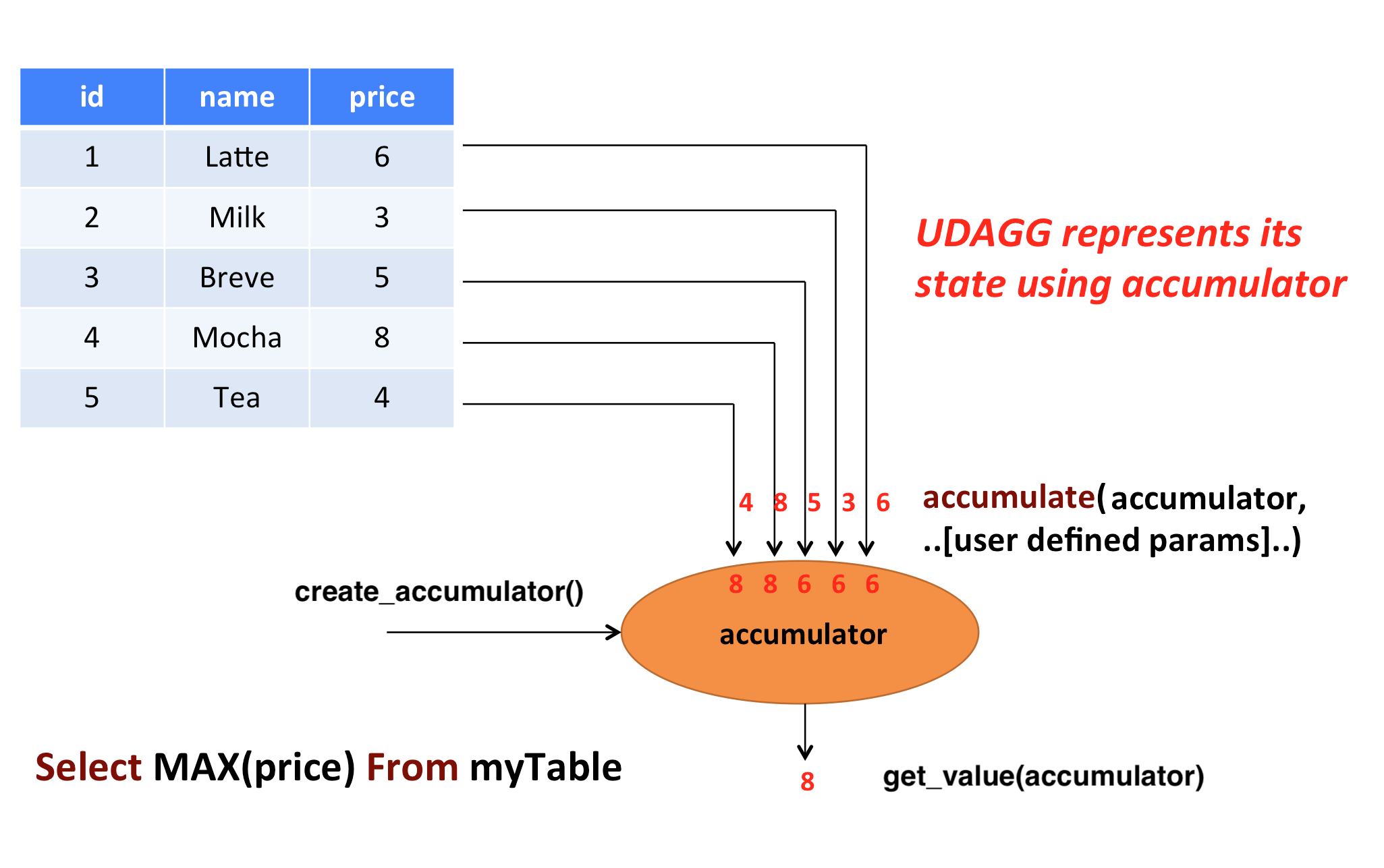
In the above example, we assume a table that contains data about beverages. The table consists of three columns (id, name,
and price) and 5 rows. We would like to find the highest price of all beverages in the table, i.e., perform
a max() aggregation.
In order to define an aggregate function, one has to extend the base class AggregateFunction in
pyflink.table and implement the evaluation method named accumulate(...).
The result type and accumulator type of the aggregate function can be specified by one of the following two approaches:
- Implement the method named
get_result_type()andget_accumulator_type(). - Wrap the function instance with the decorator
udafinpyflink.table.udfand specify the parametersresult_typeandaccumulator_type.
The following example shows how to define your own aggregate function and call it in a query.
from pyflink.common import Row
from pyflink.table import AggregateFunction, DataTypes, TableEnvironment, EnvironmentSettings
from pyflink.table.expressions import call
from pyflink.table.udf import udaf
from pyflink.table.expressions import col, lit
from pyflink.table.window import Tumble


class WeightedAvg(AggregateFunction):

    def create_accumulator(self):
        # Row(sum, count)
        return Row(0, 0)

    def get_value(self, accumulator):
        if accumulator[1] == 0:
            return None
        else:
            return accumulator[0] / accumulator[1]

    def accumulate(self, accumulator, value, weight):
        accumulator[0] += value * weight
        accumulator[1] += weight

    def retract(self, accumulator, value, weight):
        accumulator[0] -= value * weight
        accumulator[1] -= weight

    def get_result_type(self):
        return 'BIGINT'

    def get_accumulator_type(self):
        return 'ROW<f0 BIGINT, f1 BIGINT>'


env_settings = EnvironmentSettings.in_streaming_mode()
table_env = TableEnvironment.create(env_settings)
# the result type and accumulator type can also be specified in the udaf decorator:
# weighted_avg = udaf(WeightedAvg(), result_type=DataTypes.BIGINT(), accumulator_type=...)
weighted_avg = udaf(WeightedAvg())
t = table_env.from_elements([(1, 2, "Lee"),
                             (3, 4, "Jay"),
                             (5, 6, "Jay"),
                             (7, 8, "Lee")]).alias("value", "count", "name")

# call function "inline" without registration in Table API
result = t.group_by(col("name")).select(weighted_avg(col("value"), col("count")).alias("avg")).execute()
result.print()

# register function
table_env.create_temporary_function("weighted_avg", WeightedAvg())

# call registered function in Table API
result = t.group_by(col("name")).select(call("weighted_avg", col("value"), col("count")).alias("avg")).execute()
result.print()

# register table
table_env.create_temporary_view("source", t)

# call registered function in SQL
result = table_env.sql_query(
    "SELECT weighted_avg(`value`, `count`) AS avg FROM source GROUP BY name").execute()
result.print()

# use the general Python aggregate function in GroupBy Window Aggregation
tumble_window = Tumble.over(lit(1).hours) \
            .on(col("rowtime")) \
            .alias("w")

result = t.window(tumble_window) \
        .group_by(col('w'), col('name')) \
        .select(col('w').start, col('w').end, weighted_avg(col('value'), col('count'))) \
        .execute()
result.print()
The accumulate(...) method of our WeightedAvg class takes three input arguments. The first one is the accumulator
and the other two are user-defined inputs. In order to calculate a weighted average value, the accumulator
needs to store the weighted sum and count of all the data that have already been accumulated. In our example, we
use a Row object as the accumulator. Accumulators will be managed
by Flink’s checkpointing mechanism and are restored in case of failover to ensure exactly-once semantics.
Mandatory and Optional Methods #
The following methods are mandatory for each AggregateFunction:
create_accumulator()accumulate(...)get_value(...)
The following methods of AggregateFunction are required depending on the use case:
retract(...)is required when there are operations that could generate retraction messages before the current aggregation operation, e.g. group aggregate, outer join.
This method is optional, but it is strongly recommended to be implemented to ensure the UDAF can be used in any use case.merge(...)is required for session window ang hop window aggregations.get_result_type()andget_accumulator_type()is required if the result type and accumulator type would not be specified in theudafdecorator.
ListView and MapView #
If an accumulator needs to store large amounts of data, pyflink.table.ListView and pyflink.table.MapView
could be used instead of list and dict. These two data structures provide the similar functionalities as list and dict,
however usually having better performance by leveraging Flink’s state backend to eliminate unnecessary state access.
You can use them by declaring DataTypes.LIST_VIEW(...) and DataTypes.MAP_VIEW(...) in the accumulator type, e.g.:
from pyflink.table import ListView

class ListViewConcatAggregateFunction(AggregateFunction):

    def get_value(self, accumulator):
        # the ListView is iterable
        return accumulator[1].join(accumulator[0])

    def create_accumulator(self):
        return Row(ListView(), '')

    def accumulate(self, accumulator, *args):
        accumulator[1] = args[1]
        # the ListView support add, clear and iterate operations.
        accumulator[0].add(args[0])

    def get_accumulator_type(self):
        return DataTypes.ROW([
            # declare the first column of the accumulator as a string ListView.
            DataTypes.FIELD("f0", DataTypes.LIST_VIEW(DataTypes.STRING())),
            DataTypes.FIELD("f1", DataTypes.BIGINT())])

    def get_result_type(self):
        return DataTypes.STRING()
Currently, there are 2 limitations to use the ListView and MapView:
- The accumulator must be a
Row. - The
ListViewandMapViewmust be the first level children of theRowaccumulator.
Please refer to the documentation of the corresponding classes for more information about this advanced feature.
NOTE: For reducing the data transmission cost between Python UDF worker and Java process caused by accessing the data in Flink states(e.g. accumulators and data views),
there is a cached layer between the raw state handler and the Python state backend. You can adjust the values of these configuration options to change the behavior of the cache layer for best performance:
python.state.cache-size, python.map-state.read-cache-size, python.map-state.write-cache-size, python.map-state.iterate-response-batch-size.
For more details please refer to the Python Configuration Documentation.
Table Aggregate Functions #
A user-defined table aggregate function (UDTAGG) maps scalar values of multiple rows to zero, one, or multiple rows (or structured types). The returned record may consist of one or more fields. If an output record consists of only a single field, the structured record can be omitted, and a scalar value can be emitted that will be implicitly wrapped into a row by the runtime.
NOTE: Currently the general user-defined table aggregate function is only supported in the GroupBy aggregation in streaming mode.
Similar to an aggregate function, the behavior of a table aggregate is centered around the concept of an accumulator. The accumulator is an intermediate data structure that stores the aggregated values until a final aggregation result is computed.
For each set of rows that needs to be aggregated, the runtime will create an empty accumulator by calling
create_accumulator(). Subsequently, the accumulate(...) method of the function is called for each
input row to update the accumulator. Once all rows have been processed, the emit_value(...) method of
the function is called to compute and return the final result.
The following example illustrates the aggregation process:
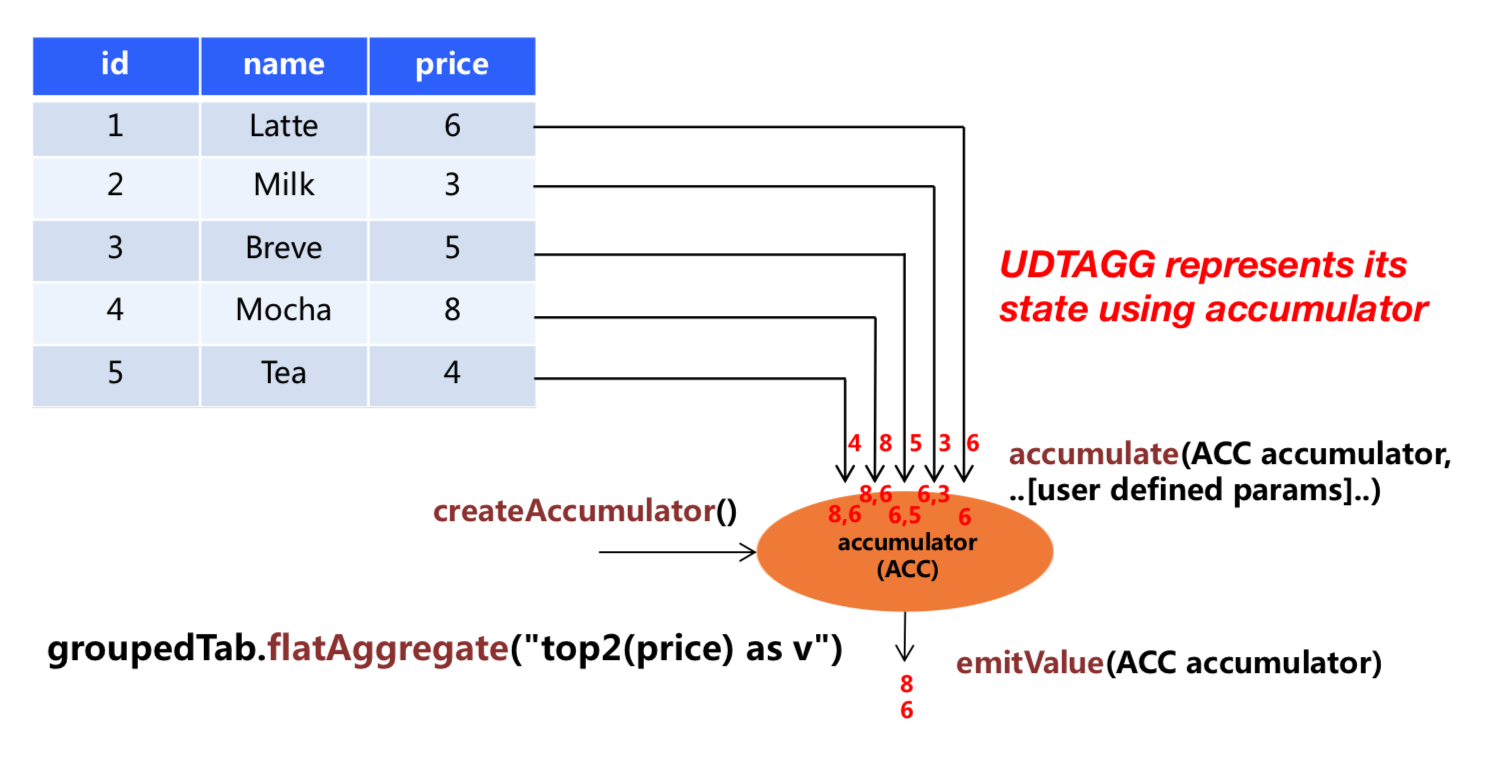
In the example, we assume a table that contains data about beverages. The table consists of three columns (id, name,
and price) and 5 rows. We would like to find the 2 highest prices of all beverages in the table, i.e.,
perform a TOP2() table aggregation. We need to consider each of the 5 rows. The result is a table
with the top 2 values.
In order to define a table aggregate function, one has to extend the base class TableAggregateFunction in
pyflink.table and implement one or more evaluation methods named accumulate(...).
The result type and accumulator type of the aggregate function can be specified by one of the following two approaches:
- Implement the method named
get_result_type()andget_accumulator_type(). - Wrap the function instance with the decorator
udtafinpyflink.table.udfand specify the parametersresult_typeandaccumulator_type.
The following example shows how to define your own aggregate function and call it in a query.
from pyflink.common import Row
from pyflink.table import DataTypes, TableEnvironment, EnvironmentSettings
from pyflink.table.expressions import col
from pyflink.table.udf import udtaf, TableAggregateFunction

class Top2(TableAggregateFunction):

    def emit_value(self, accumulator):
        yield Row(accumulator[0])
        yield Row(accumulator[1])

    def create_accumulator(self):
        return [None, None]

    def accumulate(self, accumulator, row):
        if row[0] is not None:
            if accumulator[0] is None or row[0] > accumulator[0]:
                accumulator[1] = accumulator[0]
                accumulator[0] = row[0]
            elif accumulator[1] is None or row[0] > accumulator[1]:
                accumulator[1] = row[0]

    def get_accumulator_type(self):
        return 'ARRAY<BIGINT>'

    def get_result_type(self):
        return 'ROW<a BIGINT>'


env_settings = EnvironmentSettings.in_streaming_mode()
table_env = TableEnvironment.create(env_settings)
# the result type and accumulator type can also be specified in the udtaf decorator:
# top2 = udtaf(Top2(), result_type=DataTypes.ROW([DataTypes.FIELD("a", DataTypes.BIGINT())]), accumulator_type=DataTypes.ARRAY(DataTypes.BIGINT()))
top2 = udtaf(Top2())
t = table_env.from_elements([(1, 'Hi', 'Hello'),
                             (3, 'Hi', 'hi'),
                             (5, 'Hi2', 'hi'),
                             (7, 'Hi', 'Hello'),
                             (2, 'Hi', 'Hello')],
                            ['a', 'b', 'c'])

# call function "inline" without registration in Table API
t.group_by(col('b')).flat_aggregate(top2).select(col('*')).execute().print()

# the result is:
#      b    a
# 0  Hi2  5.0
# 1  Hi2  NaN
# 2   Hi  7.0
# 3   Hi  3.0
The accumulate(...) method of our Top2 class takes two inputs. The first one is the accumulator
and the second one is the user-defined input. In order to calculate a result, the accumulator needs to
store the 2 highest values of all the data that has been accumulated. Accumulators are automatically managed
by Flink’s checkpointing mechanism and are restored in case of a failure to ensure exactly-once semantics.
The result values are emitted together with a ranking index.
Mandatory and Optional Methods #
The following methods are mandatory for each TableAggregateFunction:
create_accumulator()accumulate(...)emit_value(...)
The following methods of TableAggregateFunction are required depending on the use case:
retract(...)is required when there are operations that could generate retraction messages before the current aggregation operation, e.g. group aggregate, outer join.
This method is optional, but it is strongly recommended to be implemented to ensure the UDTAF can be used in any use case.get_result_type()andget_accumulator_type()is required if the result type and accumulator type would not be specified in theudtafdecorator.
ListView and MapView #
Similar to Aggregation function, we can also use ListView and MapView in Table Aggregate Function.
from pyflink.common import Row
from pyflink.table import ListView
from pyflink.table.types import DataTypes
from pyflink.table.udf import TableAggregateFunction

class ListViewConcatTableAggregateFunction(TableAggregateFunction):

    def emit_value(self, accumulator):
        result = accumulator[1].join(accumulator[0])
        yield Row(result)
        yield Row(result)

    def create_accumulator(self):
        return Row(ListView(), '')

    def accumulate(self, accumulator, *args):
        accumulator[1] = args[1]
        accumulator[0].add(args[0])

    def get_accumulator_type(self):
        return DataTypes.ROW([
            DataTypes.FIELD("f0", DataTypes.LIST_VIEW(DataTypes.STRING())),
            DataTypes.FIELD("f1", DataTypes.BIGINT())])

    def get_result_type(self):
        return DataTypes.ROW([DataTypes.FIELD("a", DataTypes.STRING())])
向量化自定义函数 #
向量化 Python 用户自定义函数,是在执行时,通过在 JVM 和 Python VM 之间以 Arrow 列存格式批量传输数据,来执行的函数。
向量化 Python 用户自定义函数的性能通常比非向量化 Python 用户自定义函数要高得多,
因为向量化 Python 用户自定义函数可以大大减少序列化/反序列化的开销和调用开销。
此外,用户可以利用流行的 Python 库(例如 Pandas,Numpy 等)来实现向量化 Python 用户自定义函数的逻辑。
这些 Python 库通常经过高度优化,并提供了高性能的数据结构和功能。
向量化用户自定义函数的定义,与非向量化用户自定义函数具有相似的方式,
用户只需要在调用 udf 或者 udaf 装饰器时添加一个额外的参数 func_type="pandas",将其标记为一个向量化用户自定义函数即可。
向量化标量函数 #
向量化 Python 标量函数以 pandas.Series 类型的参数作为输入,并返回与输入长度相同的 pandas.Series。
在内部实现中,Flink 会将输入数据拆分为多个批次,并将每一批次的输入数据转换为 Pandas.Series 类型,
然后为每一批输入数据调用用户自定义的向量化 Python 标量函数。请参阅配置选项
python.fn-execution.arrow.batch.size,
以获取有关如何配置批次大小的更多详细信息。
向量化 Python 标量函数可以在任何可以使用非向量化 Python 标量函数的地方使用。
以下示例显示了如何定义自己的向量化 Python 标量函数,该函数计算两列的总和,并在查询中使用它:
from pyflink.table import TableEnvironment, EnvironmentSettings
from pyflink.table.expressions import col
from pyflink.table.udf import udf

@udf(result_type='BIGINT', func_type="pandas")
def add(i, j):
  return i + j

settings = EnvironmentSettings.in_batch_mode()
table_env = TableEnvironment.create(settings)

# use the vectorized Python scalar function in Python Table API
my_table.select(add(col("bigint"), col("bigint")))

# 在SQL API中使用Python向量化标量函数
table_env.create_temporary_function("add", add)
table_env.sql_query("SELECT add(bigint, bigint) FROM MyTable")
向量化聚合函数 #
向量化 Python 聚合函数以一个或多个 pandas.Series 类型的参数作为输入,并返回一个标量值作为输出。
注意 现在返回类型还不支持 RowType 和 MapType。
向量化 Python 聚合函数能够用在 GroupBy Aggregation(Batch),GroupBy Window Aggregation(Batch and Stream) 和
Over Window Aggregation(Batch and Stream bounded over window)。关于聚合的更多使用细节,你可以参考
相关文档.
注意 向量化聚合函数不支持部分聚合,而且一个组或者窗口内的所有数据, 在执行的过程中,会被同时加载到内存,所以需要确保所配置的内存大小足够容纳这些数据。
以下示例显示了如何定一个自己的向量化聚合函数,该函数计算一列的平均值,并在 GroupBy Aggregation, GroupBy Window Aggregation
and Over Window Aggregation 使用它:
from pyflink.table import TableEnvironment, EnvironmentSettings
from pyflink.table.expressions import col, lit
from pyflink.table.udf import udaf
from pyflink.table.window import Tumble

@udaf(result_type='FLOAT', func_type="pandas")
def mean_udaf(v):
    return v.mean()

settings = EnvironmentSettings.in_batch_mode()
table_env = TableEnvironment.create(settings)

my_table = ...  # type: Table, table schema: [a: String, b: BigInt, c: BigInt]

# 在 GroupBy Aggregation 中使用向量化聚合函数
my_table.group_by(col('a')).select(col('a'), mean_udaf(col('b')))


# 在 GroupBy Window Aggregation 中使用向量化聚合函数
tumble_window = Tumble.over(lit(1).hours) \
            .on(col("rowtime")) \
            .alias("w")

my_table.window(tumble_window) \
    .group_by(col("w")) \
    .select(col('w').start, col('w').end, mean_udaf(col('b')))

# 在 Over Window Aggregation 中使用向量化聚合函数
table_env.create_temporary_function("mean_udaf", mean_udaf)
table_env.sql_query("""
    SELECT a,
        mean_udaf(b)
        over (PARTITION BY a ORDER BY rowtime
        ROWS BETWEEN UNBOUNDED preceding AND UNBOUNDED FOLLOWING)
    FROM MyTable""")
除了直接定义一个 Python 函数之外,还支持多种方式来定义向量化 Python 聚合函数。 以下示例显示了多种定义向量化 Python 聚合函数的方式。该函数需要两个类型为 bigint 的参数作为输入参数,并返回它们的最大值的和作为结果。
from pyflink.table.udf import AggregateFunction, udaf

# 方式一:扩展基类 `AggregateFunction`
class MaxAdd(AggregateFunction):

    def open(self, function_context):
        mg = function_context.get_metric_group()
        self.counter = mg.add_group("key", "value").counter("my_counter")
        self.counter_sum = 0

    def get_value(self, accumulator):
        # counter
        self.counter.inc(10)
        self.counter_sum += 10
        return accumulator[0]

    def create_accumulator(self):
        return []

    def accumulate(self, accumulator, *args):
        result = 0
        for arg in args:
            result += arg.max()
        accumulator.append(result)

max_add = udaf(MaxAdd(), result_type='BIGINT', func_type="pandas")

# 方式二:普通 Python 函数
@udaf(result_type='BIGINT', func_type="pandas")
def max_add(i, j):
  return i.max() + j.max()

# 方式三:lambda 函数
max_add = udaf(lambda i, j: i.max() + j.max(), result_type='BIGINT', func_type="pandas")

# 方式四:callable 函数
class CallableMaxAdd(object):
  def __call__(self, i, j):
    return i.max() + j.max()

max_add = udaf(CallableMaxAdd(), result_type='BIGINT', func_type="pandas")

# 方式五:partial 函数
def partial_max_add(i, j, k):
  return i.max() + j.max() + k

max_add = udaf(functools.partial(partial_max_add, k=1), result_type='BIGINT', func_type="pandas")
打包 UDFs #
如果你在非 local 模式下运行 Python UDFs 和 Pandas UDFs,且 Python UDFs 没有定义在含 main() 入口的 Python 主文件中,强烈建议你通过 python-files 配置项指定 Python UDF 的定义。
否则,如果你将 Python UDFs 定义在名为 my_udf.py 的文件中,你可能会遇到 ModuleNotFoundError: No module named 'my_udf' 这样的报错。
在 UDF 中载入资源 #
有时候,我们想在 UDF 中只载入一次资源,然后反复使用该资源进行计算。例如,你想在 UDF 中首先载入一个巨大的深度学习模型,然后使用该模型多次进行预测。
你要做的是重载 UserDefinedFunction 类的 open 方法。
class Predict(ScalarFunction):
    def open(self, function_context):
        import pickle

        with open("resources.zip/resources/model.pkl", "rb") as f:
            self.model = pickle.load(f)

    def eval(self, x):
        return self.model.predict(x)

predict = udf(Predict(), result_type=DataTypes.DOUBLE(), func_type="pandas")
访问作业参数 #
The open() method provides a FunctionContext that contains information about the context in which
user-defined functions are executed, such as the metric group, the global job parameters, etc.
The following information can be obtained by calling the corresponding methods of FunctionContext:
| Method | Description |
|---|---|
get_metric_group() |
Metric group for this parallel subtask. |
get_job_parameter(name, default_value) |
Global job parameter value associated with given key. |
class HashCode(ScalarFunction):

    def open(self, function_context: FunctionContext):
        # access the global "hashcode_factor" parameter
        # "12" would be the default value if the parameter does not exist
        self.factor = int(function_context.get_job_parameter("hashcode_factor", "12"))

    def eval(self, s: str):
        return hash(s) * self.factor

hash_code = udf(HashCode(), result_type=DataTypes.INT())
TableEnvironment t_env = TableEnvironment.create(...)
t_env.get_config().set('pipeline.global-job-parameters', 'hashcode_factor:31')
t_env.create_temporary_system_function("hashCode", hash_code)
t_env.sql_query("SELECT myField, hashCode(myField) FROM MyTable")
测试自定义函数 #
假如你定义了如下 Python 自定义函数:
add = udf(lambda i, j: i + j, result_type=DataTypes.BIGINT())
如果要对它进行单元测试,首先需要通过 ._func 从 UDF 对象中抽取原来的 Python 函数,然后才能测试:
f = add._func
assert f(1, 2) == 3